



Aprking
Inspiring
October 10, 2023
Answered

How can I correctly move unexpanded Compound Shapes in Illustrator using a script?

  • October 10, 2023
  • 2 replies
  • 883 views

When I try to move and scale selected objects in Illustrator using a script, the unexpanded Compound Shapes cannot be moved correctly, while other objects or groups (including unexpanded Compound Shapes) can be moved correctly. Can anyone guide me on how to modify the JSX script to properly move these objects?
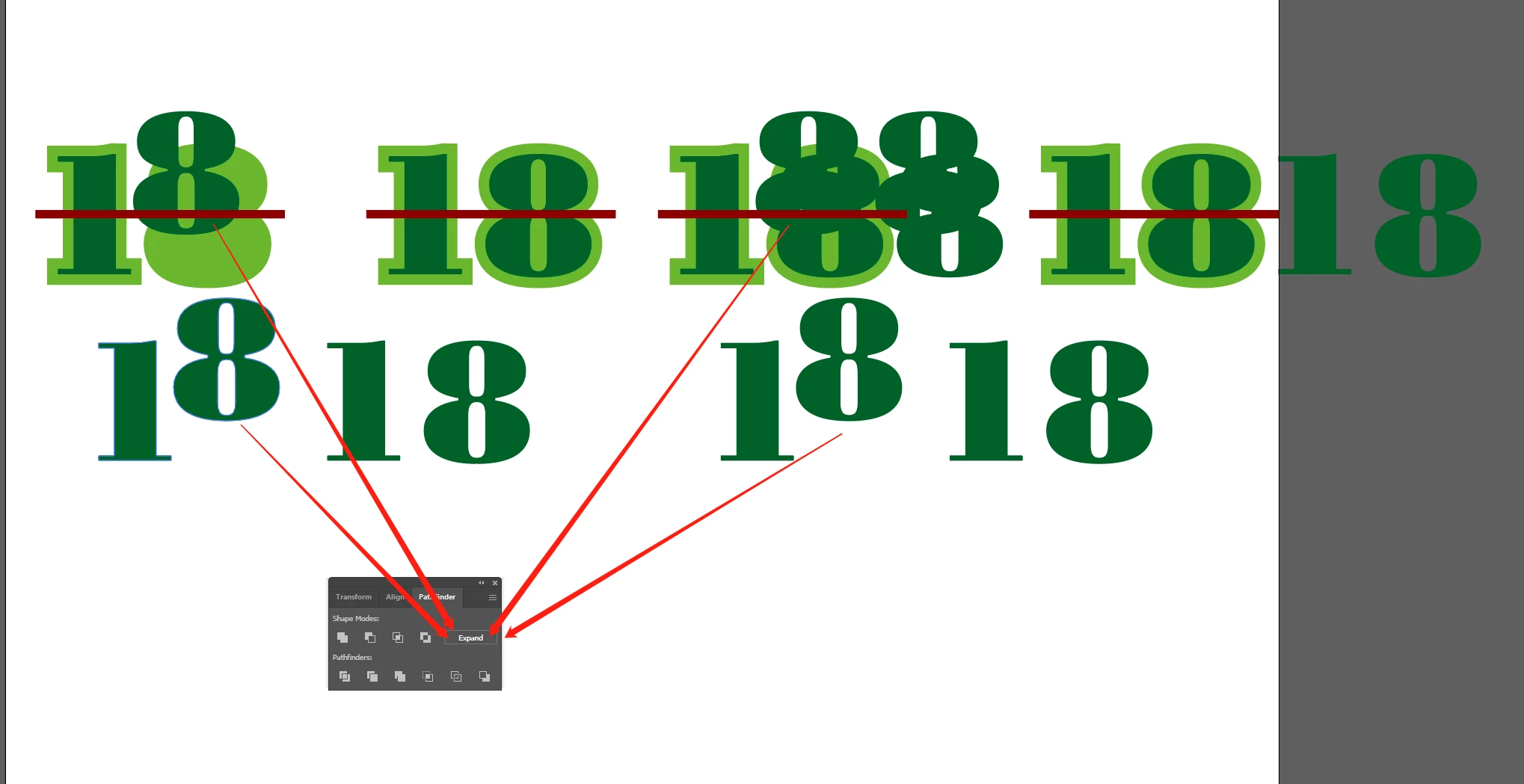


var doc = app.activeDocument;
var selection = doc.selection;

var moveX = 10; 
var moveY = 20;
var scaleX = 0.9;
var scaleY = 0.8;

for (var i = 0; i < selection.length; i++) {
  var item = selection[i];

  if (item.parent instanceof GroupItem) {
    continue;
  }

  item.resize(
    scaleX * 100, // x
    scaleY * 100, // y
    true, // changePositions
    true, // changeFillPatterns_value
    true, // changeFillGradients
    true, // changeStrokePattern
    1 ? Math.sqrt(scaleX * scaleY) * 100 : 100,
    Transformation.TOPLEFT
  );
  item.left += moveX;
  item.top -= moveY;
}



This topic has been closed for replies.
Correct answer Sergey Osokin

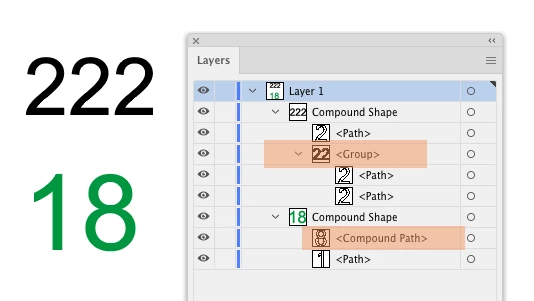
I realized what was going on. You ran into an ExtendScript bug, and there are a lot of themIf a Compound Shape contains a Group of objects or a Compound Path (orange labels), the script skips these objects and processes only simple <Path> objects.

I would like to say that there is a workaround for this bug, which requires manual selection of only <Path> inside the Compound Shape: https://aiscripts.medium.com/compound-shape-mess-6b6c44e8c08. But your task is to process all selected objects in a FOR loop, so I don't see a good solution here.

2 replies

Sergey Osokin
Inspiring
October 11, 2023

I'm going to take a wild guess. Inside the compound shape, you have not only individual paths, but also groups of paths? Can you show a screenshot of the contents of Compound Shape?

Aprking
AprkingAuthor
Inspiring
October 11, 2023

 Your guess proves that you are very intelligent. This test file does indeed contain PluginItem, path, CompoundPathItem, and GroupItem, so there are always some objects that cannot be moved or scaled correctly.

Sergey Osokin
Sergey OsokinCorrect answer
Inspiring
October 11, 2023

I realized what was going on. You ran into an ExtendScript bug, and there are a lot of themIf a Compound Shape contains a Group of objects or a Compound Path (orange labels), the script skips these objects and processes only simple <Path> objects.

I would like to say that there is a workaround for this bug, which requires manual selection of only <Path> inside the Compound Shape: https://aiscripts.medium.com/compound-shape-mess-6b6c44e8c08. But your task is to process all selected objects in a FOR loop, so I don't see a good solution here.

femkeblanco
Legend
October 10, 2023

Try changing this statement

  if (item.parent instanceof GroupItem) {
    continue;
  }

to

  if (item.parent.typename == "PluginItem" || 
      item.parent.typename == "GroupItem") {
    continue;
  }
Aprking
AprkingAuthor
Inspiring
October 11, 2023

Thank you for your help! However, the code still hasn't solved this problem.