This topic has been closed for replies.
Correct answer Dave Creamer of IDEAS

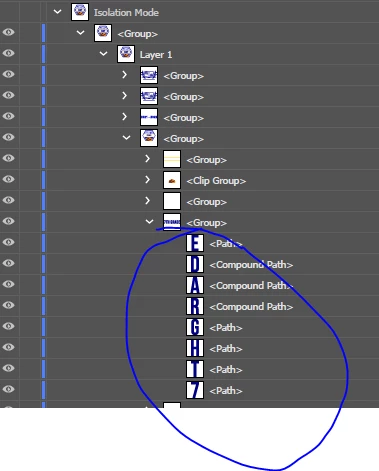
As @Kurt Gold mentioned, the original text was converted into path outlines. It isn't editable text anymore, but graphic shapes. 


You will have to retype the text and format it from scratch (unless there is a copy of the file before the type was outlined). 


3 replies

Dave Creamer of IDEAS
Community Expert
Dave Creamer of IDEASCommunity ExpertCorrect answer
Community Expert
August 3, 2022

As @Kurt Gold mentioned, the original text was converted into path outlines. It isn't editable text anymore, but graphic shapes. 


You will have to retype the text and format it from scratch (unless there is a copy of the file before the type was outlined). 


David Creamer: Community Expert (ACI and ACE 1995-2023)
Participant
August 3, 2022

Thanks you all.  this is an image that I am taking over managing and new to the photoshop/Illustrator world.  appreciate all your help.  will get the image files prior the type being outlined.

Legend
August 3, 2022

Since that text have been coverted to shapes, you will need to figure out what font it was (or something close), and re-type it with the text tool.

Kurt Gold
Community Expert
Community Expert
August 3, 2022

Not quite sure what you are going to do, but according to the highlighted section in the Layers palette, you don't have live type objects. Only path objects.


Can you clarify a bit?