
DigitalChickster
Legend
April 19, 2018
Answered

How can I get Photoshop to show up as an option to open a .ai file?

  • April 19, 2018
  • 1 reply
  • 1015 views

Hi all! This is a nitpicky question. But it is an issue that costs me time. Basically, I sometimes want to open .ai files with Photoshop. But when I right click on the .ai file, then go to "Open with"... Photoshop is NOT one of the options. Then I have to "show" the computer where Photoshop is. This seems like a waste of time. How do I "show" Illustrator that Photoshop is always an option?

Yes, I can create a pdf and THAT shows Photoshop as an option. And I can open the .ai via Photoshop. But I thought there might be a way to get Photoshop into my list of programs automatically.

Thanks!
    This topic has been closed for replies.
    Correct answer Om Nath Jha

    Hi AABBCCJuile,

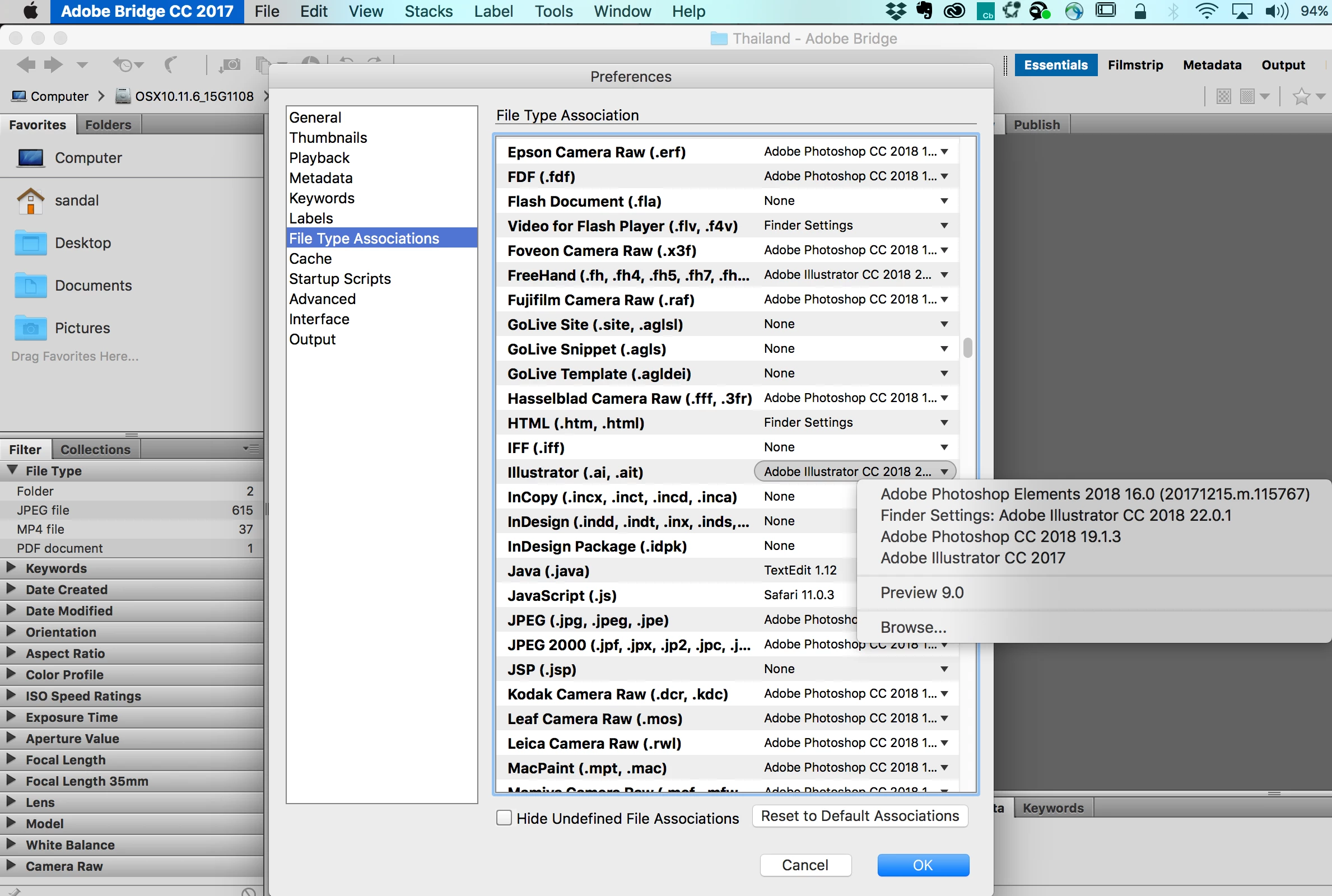
    You can download Adobe Bridge (Digital asset management software | Download free Adobe Bridge CC trial), it's a part of your CC subscription to change the "File Type Associations" for .ai files to Photoshop. Once you do that, your Illustrator files would open in Photoshop by default. Here's a screenshot:

    Regards,

    Om

    1 reply

    Om Nath Jha
    Om Nath JhaCorrect answer
    Legend
    April 26, 2018

    Hi AABBCCJuile,

    You can download Adobe Bridge (Digital asset management software | Download free Adobe Bridge CC trial), it's a part of your CC subscription to change the "File Type Associations" for .ai files to Photoshop. Once you do that, your Illustrator files would open in Photoshop by default. Here's a screenshot:

    Regards,

    Om

    DigitalChickster
    Legend
    April 26, 2018

    Thank you! I already have Bridge. I didn't know that was one of its features!

    Om Nath Jha
    Legend
    April 26, 2018

    Glad to hear that you are already using it. It's a cool app and really helpful.

    Regards,

    Om