
Known Participant
June 2, 2023
Answered

How can I get rid of these preview lines in blend

  • June 2, 2023
  • 1 reply
  • 373 views

Hi,

I am seeing these unknown preview lines while using blending option. The same is not visible when I am turning to CPU preview.

So this might be linked with GPU preview. I have right now updated the GPU driver too and still seeing these lines. I have also checked it with latest version of illustrator too.


i9, 16GB, W10, Illustrator v2021
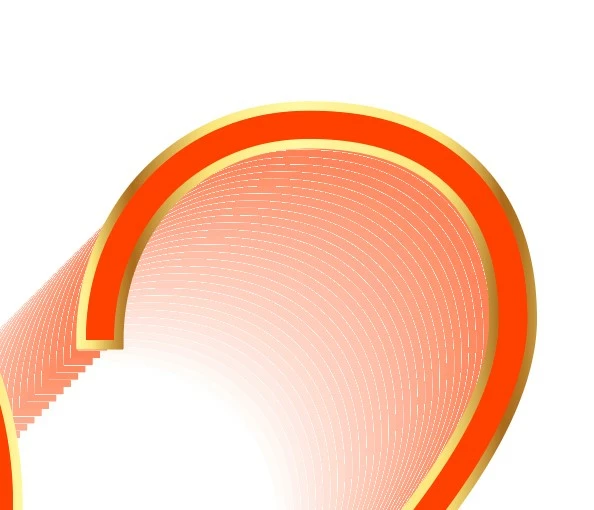
 

What can be the issue here?

This topic has been closed for replies.
Correct answer Jacob Bugge

You are welcome, StarAG, and thank you for sharing.


Just as the general preferences can get corrupted (making it impossible to work in any and all documents) and require resetting, each document can get corrupted.


Sometmes, as in your case, everything can be copied over.


In other cases, some specific part(s) of the artwork are ailing and need replacing, and then it is necessary to copy the sound parts of the artwork over in suitable chunks and check in between to see what can be rescued. This can take some time.

1 reply

Jacob Bugge
Community Expert
Community Expert
June 2, 2023

StarAG,


GPU is fast, but sometimes it moves in mysterious ways. There have been countless questions about it here, ever since it first appeared.


If the artwork looks fine in CPU and works fine in actual print or other use, there is no need to worry.


Can you show how it looks in CPU, too?


It simply looks like too few steps in the Blend, some 13.


What happens if you set Specified Steps to a much larger number such as 256 in Blend Options?


StarAG​Author
Known Participant
June 2, 2023

Hi, Thankyou for reply,

I created new document and copy pasted the whole stuff in there and it works fine.


It looks like it was issue with GPU + the document. Which I don't know why.

Well it seems to work fine now.

Jacob Bugge
Community Expert
Jacob BuggeCommunity ExpertCorrect answer
Community Expert
June 2, 2023

You are welcome, StarAG, and thank you for sharing.


Just as the general preferences can get corrupted (making it impossible to work in any and all documents) and require resetting, each document can get corrupted.


Sometmes, as in your case, everything can be copied over.


In other cases, some specific part(s) of the artwork are ailing and need replacing, and then it is necessary to copy the sound parts of the artwork over in suitable chunks and check in between to see what can be rescued. This can take some time.