This topic has been closed for replies.
Correct answer Ton Frederiks

I was just describing a similar solution as Monika just posted, here is my version:

You probably do not want a pattern, but random placed pictures in a grid.

You can automate parts of it by using scripts.

First create an Illustrator document with your pictures made into symbols (this will keep the final file size down).
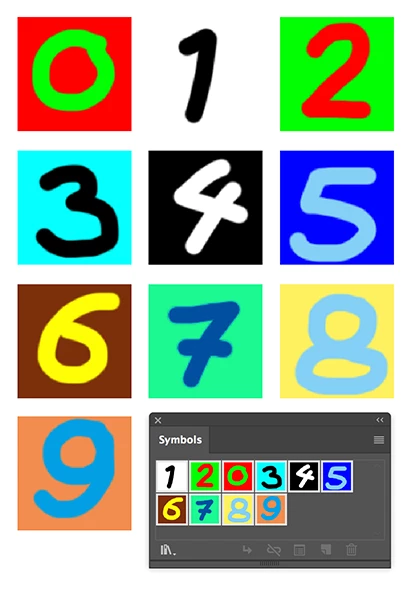
Second create a document at the size you want and fill it with the number of tiles you want.

You can do that by selecting a rectangle and choose Object > Path > Split Into Grid…
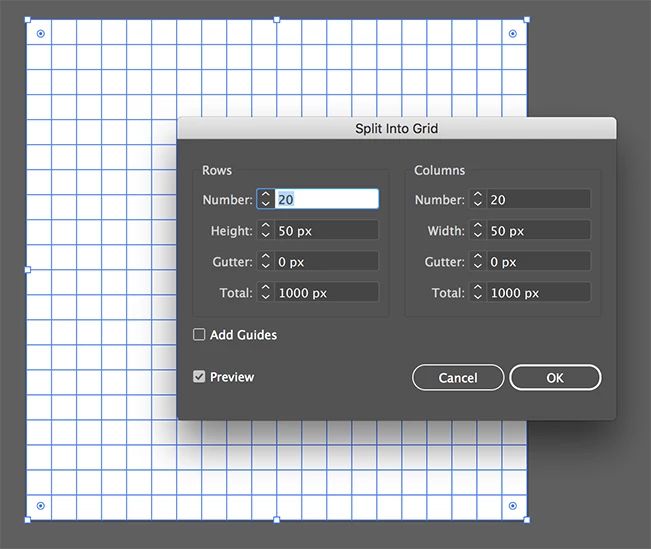
To create the randomness, fill the grid with random colors.

Select first the Grid and Shift click  select the same number of color swatches as the number of images you have.
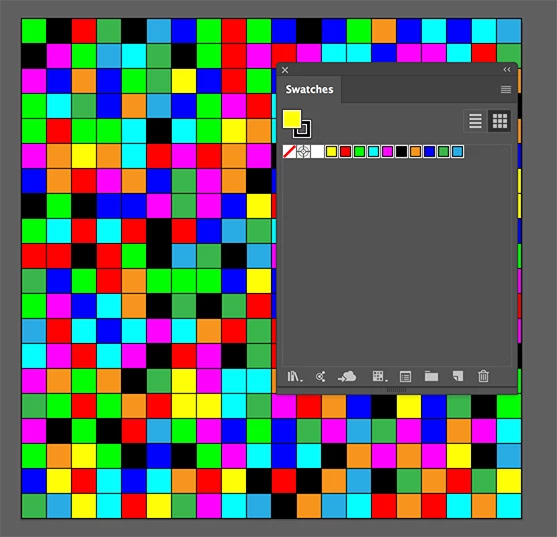
Use the RandomSwatchesFill script to fill the rectangles

You can find the script here:

Random Swatches Fill – Free Scripts for Adobe Illustrator - Freebies - Vectorboom

You can now replace the colored rectangles by the symbol images with the Zamena script (I used Zamena Size).

You can find the script here:

zamena_size [Illustrator Praxis]
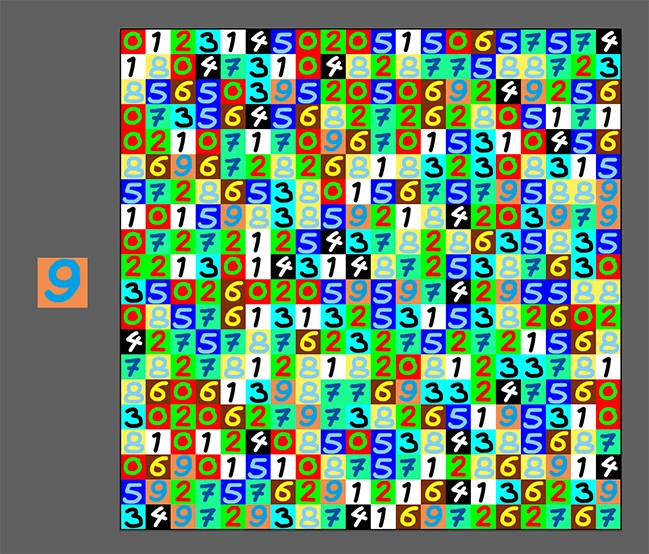
Copy the first image symbol and paste it into the colored grid document.

Select the first colored object and choose: Select > Same > Fill Color

Shift click to add the symbol image to the selection and use the Samena Size script.

Deselect and delete the image symbol.

Repeat untill all the colors are replaced by images.

5 replies

Ton Frederiks
Community Expert
Ton FrederiksCommunity ExpertCorrect answer
Community Expert
February 22, 2018

I was just describing a similar solution as Monika just posted, here is my version:

You probably do not want a pattern, but random placed pictures in a grid.

You can automate parts of it by using scripts.

First create an Illustrator document with your pictures made into symbols (this will keep the final file size down).

Second create a document at the size you want and fill it with the number of tiles you want.

You can do that by selecting a rectangle and choose Object > Path > Split Into Grid…

To create the randomness, fill the grid with random colors.

Select first the Grid and Shift click  select the same number of color swatches as the number of images you have.

Use the RandomSwatchesFill script to fill the rectangles

You can find the script here:

Random Swatches Fill – Free Scripts for Adobe Illustrator - Freebies - Vectorboom

You can now replace the colored rectangles by the symbol images with the Zamena script (I used Zamena Size).

You can find the script here:

zamena_size [Illustrator Praxis]

Copy the first image symbol and paste it into the colored grid document.

Select the first colored object and choose: Select > Same > Fill Color

Shift click to add the symbol image to the selection and use the Samena Size script.

Deselect and delete the image symbol.

Repeat untill all the colors are replaced by images.

FsabreuAuthor
Participant
February 22, 2018

Thank you, works perfectly.

I just user Kelso Cartography​ script instead Zamena Size.

FsabreuAuthor
Participant
February 22, 2018

Thanks everyone for the answers.

And sorry to post the link. This is my example.

Monika Gause
Community Expert
Community Expert
February 22, 2018

Thank you.

What you could do:

Make symbols of all the single image tiles you want to use (you need each image tile once)

Make a pattern of squares. There are several possiblities to do this.

One would be to place a photo that has the dimensions of the final artwork.

Then use Object > Object Mosaic to turn it into vector squares at the size you need.

Then you need to just select all the squared of the same color and replace them by one of your symbols.

There's a script that does that: Find and Replace graphics: Kelso Cartography

Then select the next set of suqares and replace them and so on.

You couls also use different scripts that deselect random elements: Sélection aléatoire d'objets dans illustrator

barbara_a7746676
Community Expert
Community Expert
February 22, 2018

As chanaart mentioned, you can create patterns that include images if they are not linked. However, in the example pattern that you gave, the tiles seem to be quite random. I don't see a consistent placement of the various tiles. Therefore, I think that the example was put together manually.

You can make an automatically repeating pattern, but only if the tiles consistently repeat in the same position. So I would have to say 'no' in this case; it would not be possible to create such a pattern automatically.

chanaart
Community Expert
Community Expert
February 22, 2018

You can do Pattern with images if they are not linked. Send a sample or a screenshot to show what you need to do.

Chana

Monika Gause
Community Expert
Community Expert
February 22, 2018

What kind of file is that? Can you please upload a screenshot to the forum?

Thank you. I don't want to infect my computer with some malware.