
Participant
October 30, 2019
Answered

How can I make objects follow a circular path?

  • October 30, 2019
  • 2 replies
  • 9696 views

Hello, I need some help figuring out how I can make objects follow a circular path in illustrator. I know how to make actual text follow a path but I made "The Collection" myself using rectangles and then united them. I also know I can put it in an envelope but I can't seem to configure it to make it look as nice as it would if it were actual text on a path. I'm fairly new to illustrator so any help would be much appreciated, thank you! 
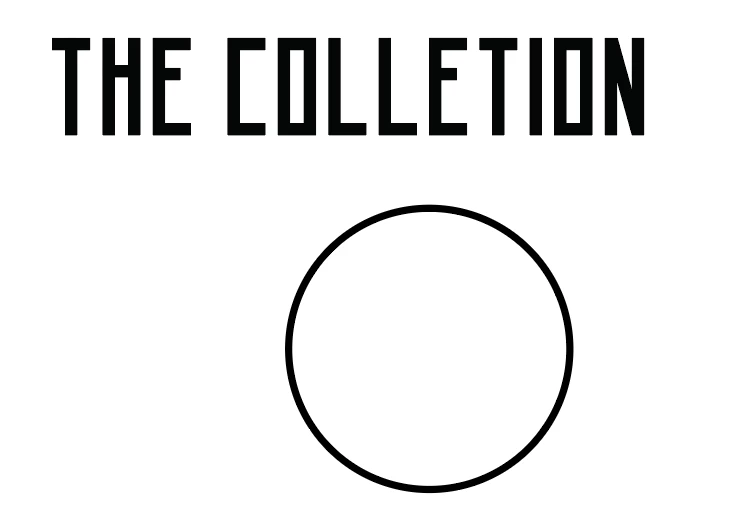
 

P.S. in case it matters, I'd like "THE" to wrap around the top of the circle and "COLLECTION" to wrap around the bottom. Thanks again for any help!

This topic has been closed for replies.
Correct answer Mario Arizmendi

If you don't like the Envelope Distort Option result,  maybe you want to convert your drawing int a font for a better result, so here you can see one of the many options available on the internet.


2 replies

Legend
October 30, 2019

Well text (on a path) can follow a path, a circle, but just in one direction, thus being able to convert your objects into a font you will need two circles (one on top of the other) or split the circle in 2 halves.

Therefore I would suggest you two work separately on both words.

Have you tried the command: Object>Envelope Distortion>Make with Warp? 

Tip, place white or not filled rectangles of the same size below each word, and group with each word, in order the distortion is pretty similar to the long and short word.

You can also do the very same thing using Effects>Warp.


Participant
October 30, 2019

I see, thank you for the tip as I'm sure it'll be of use to me in the future. For this though, I think my best bet is just making my custom text into a font. 

Legend
October 31, 2019

Thank you, I assume you have been able to align text on both sides, in opposite directions as I commented you, and you may already knew about.

Mario Arizmendi
Mario ArizmendiCorrect answer
Legend
October 30, 2019

If you don't like the Envelope Distort Option result,  maybe you want to convert your drawing int a font for a better result, so here you can see one of the many options available on the internet.


Mario Arizmendi
Legend
October 30, 2019

her is the a quick example with the drawing converted to a font


Participant
October 30, 2019

Looks pretty good actually. I tried the font generator you suggested but it only recognized a few of the letters and everything else showed up as empty boxes. I'll try it again though and be sure to be more precise with how I align each letter to the template. Also if you used caligrapher to make the font, did you just line up the letters with the template, rasterize it all, then upload it to calligrapher?