
Inspiring
September 30, 2024
Question

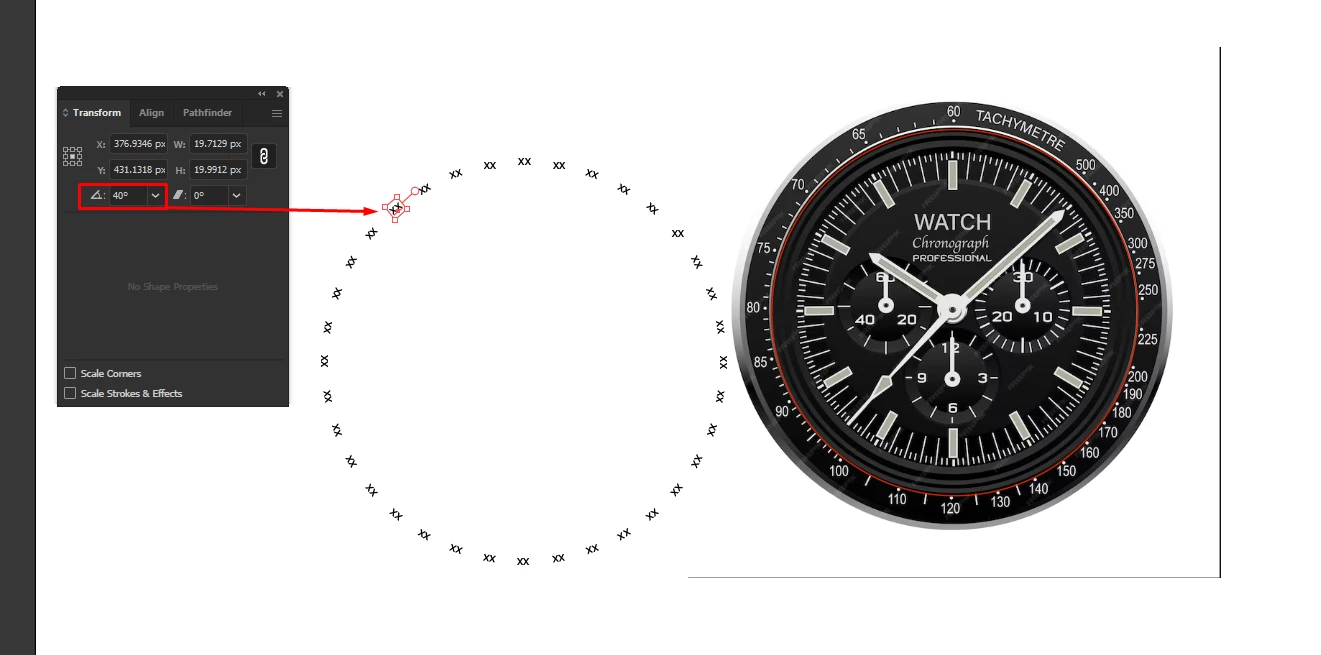
How can I make tachymeter numbers rotating around a circle

  • September 30, 2024
  • 1 reply
  • 210 views

Hi community. 


I want to make numbers rotating around a circular shape. I do it the classic way, but the orientation of the numbers are in a circular direction. 


I want the numbers to be like in the example of the Tachymetre, which are sitting ( Like a clock/watch).

And not on the side going around.


I found a way to make this possible by going to the transform panel and setting it to 0, and doing it manually one by one which is a tedious process. So is there a faster method to achieve this?


Thank you.


This topic has been closed for replies.

1 reply

Monika Gause
Community Expert
Community Expert
September 30, 2024

You could do it in InDesign and then copy back to Illustrator.


But in your example they are all spaces out a little unevenly (mathematically, but in the end with hte uneven mathematical spacing it works out visually)

Inspiring
September 30, 2024

Thank you for your suggestion. I found this tutorial, while Googling how to do it in Indesign.


https://community.adobe.com/t5/illustrator-discussions/positioning-numbers-on-a-clock-face-without-them-rotating/td-p/10470476