
mzdpopescu
Participant
August 2, 2019
Question

How can I make this?

  • August 2, 2019
  • 3 replies
  • 831 views

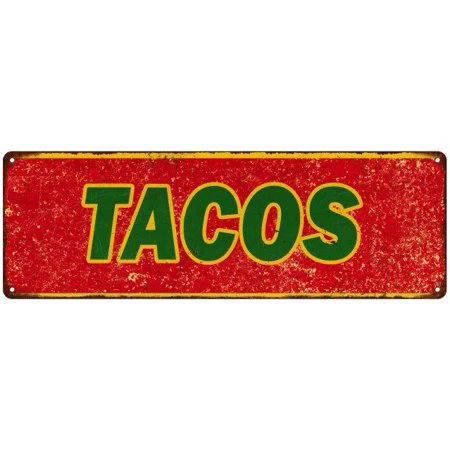
Hey gusy I'm a little rusty in illustrator and Photoshop and I am tying to make this sign with the a different word other then tacos. can someone please help me with this? I'd like to know what effects or steps i need to take (step by step),to achieve the red, distressed background and distressed yellow border on the top and bottom. Please help if you can. Thanks 🙂
    This topic has been closed for replies.

    3 replies

    Myra Ferguson
    Community Expert
    Community Expert
    August 2, 2019

    I'd probably use Photoshop for it. Select the area around TACOS, use Content Aware Fill, then set your new text. Try out different Blend modes and opacities to see what makes the text look like it goes with the background best.

    michelew83603738
    Community Expert
    Community Expert
    August 2, 2019

    I would design the text and rectangle in Illustrator and then bring them into Photoshop (as a Smart Object so that they remain editable) and add the texture there. Best of both worlds.

    sishamIAGD
    Community Expert
    Community Expert
    August 2, 2019
    Monika Gause
    Community Expert
    Community Expert
    August 2, 2019

    The distressed look on the yellow lines might be achieved using the roughen effect or brushes.

    The distressed look on the red background might be achieved by overlaying a rusty texture (or by using an opacity mask).

    You could search for Grunge or distressed on your favourite search engine in order to find tutorials. There should be plenty.

    Search phrase: Illustrator tutorial grunge, illustrator tutorial distressed