Answered
How can I make this effect
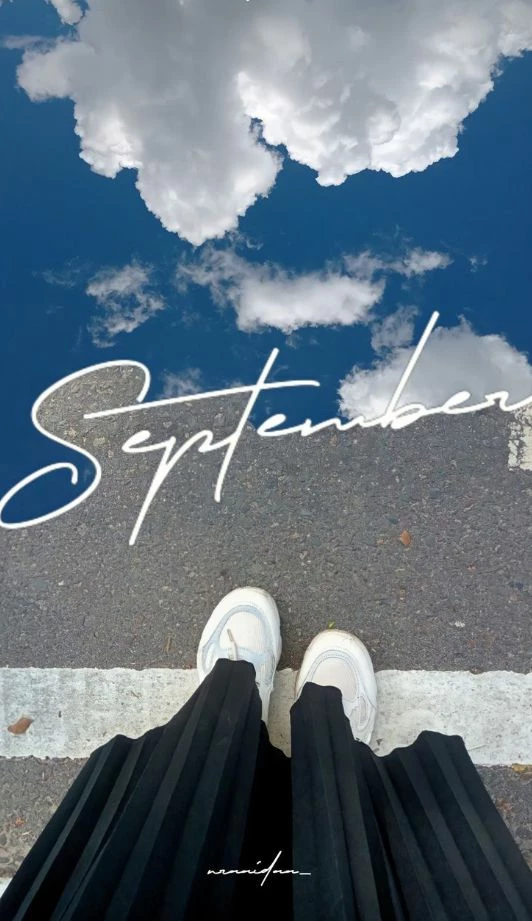
How can I make the letter separate two images like in the poster above? I need help with this. Can anyone who knows how to do it help me, and can you provide specific steps for each step?
Thank you

How can I make the letter separate two images like in the poster above? I need help with this. Can anyone who knows how to do it help me, and can you provide specific steps for each step?
Thank you
Place your images and the text.
Text > Create Outlines
Draw a rectangle and color it differently
Close open gaps between the letters with lines.
Select the outlined text and the connector lines and the rectangle and take the shapebuilder tool
Fill the upper part with yet another different color. Fill all the parts with that color that you want the image in
When done, select one of the parts of the initial rectangle that need to be gone. Select > Same > Fill color
Delete
Select all the parts that should be filled with the new image (you can use Select Same for that as well)
Connect them with the Pathfinder panel. If there are parts that do not join, then you need to make a compound path in addition
Put the second image below this shape.
Make a clipping mask
Already have an account? Login
No account yet? Create an account
Enter your E-mail address. We'll send you an e-mail with instructions to reset your password.


 AdChoices