
Inspiring
October 30, 2023
Question

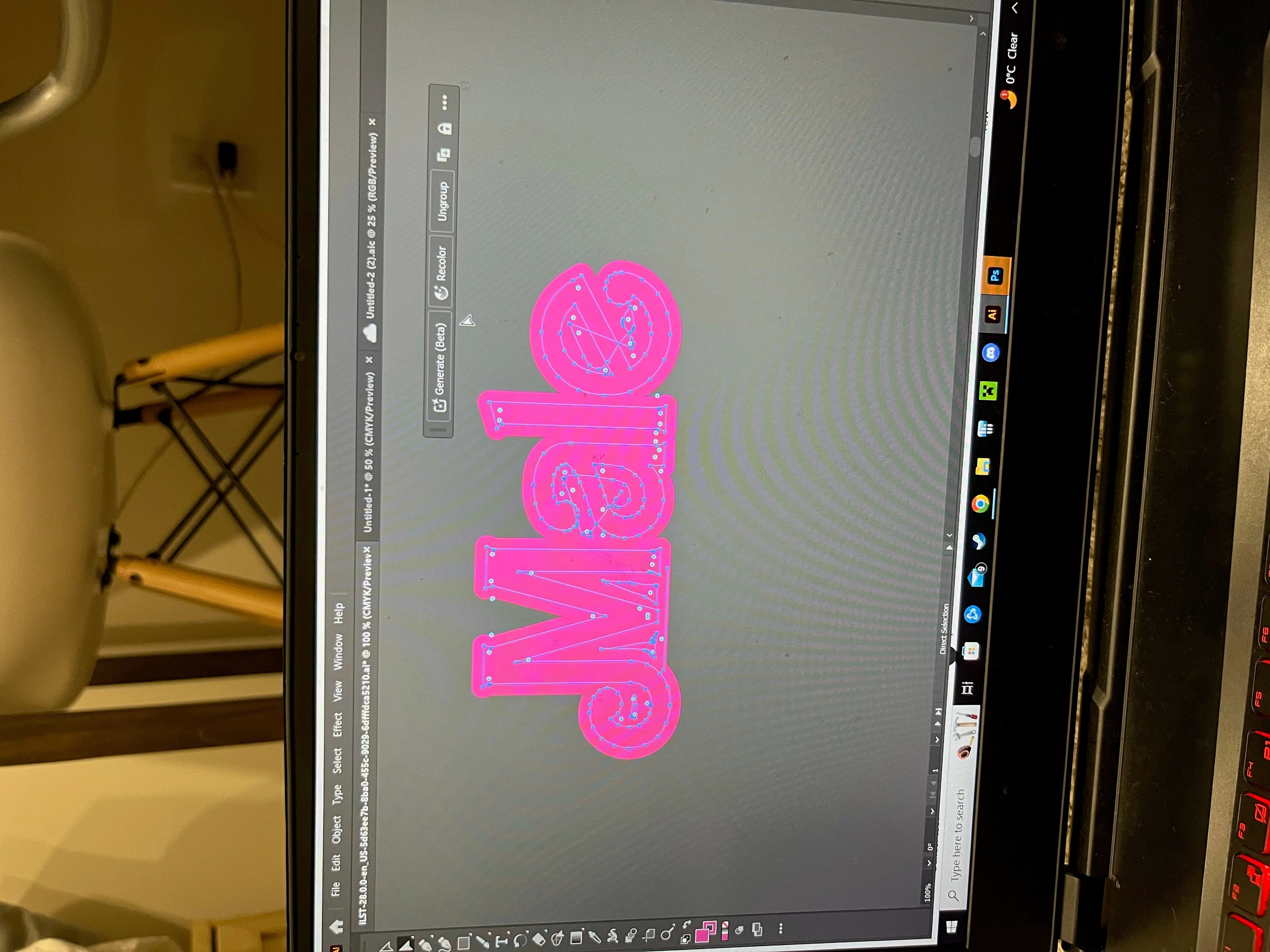
How can I merge this all into one solid object?

  • October 30, 2023
  • 6 replies
  • 1025 views


(excuse the rotated photo my prtscr button doesn't work) 


Trying to merge this all as one object. Started as text, added stroke, expanded object, used the brush tool to fill in gaps, connected anchor points of brush stroke paths to close paths. Now whenever I click "unite" in Pathfinder it doesn't do what I want. Advice? 
This topic has been closed for replies.

6 replies

Jlily98Author
Inspiring
November 8, 2023

Update: I just traced it 

Michael Ambroise
Community Expert
Community Expert
October 31, 2023

Why you don't use the shape builder tool ?

_______Senior graphic designer | United Nations Population Fund
Monika Gause
Community Expert
Community Expert
October 31, 2023

@Michael Ambroise  schrieb:

Why you don't use the shape builder tool ?


Because that would mean a lot of clicking around in small shapes. If you can do it with one mouseclick then that is certainly better for the workflow.

Michael Ambroise
Community Expert
Community Expert
October 31, 2023

I agree with you, Monika. This is indeed a large number of clicks, as you pointed out. However, if Pathfinder fails to produce the desired result, I think this is still an option worth considering.

_______Senior graphic designer | United Nations Population Fund
Monika Gause
Community Expert
Community Expert
October 30, 2023

There is still a stroke on it. Or maybe even a brush. So if Object > Path > Outline stroke does not do it, first Expand appearance. 

Then try OPathfinder again. Remember that you have to use it from the panel, not from the effects menu.

Community Expert
November 1, 2023

Yeah, the preview image posted looks like there is a live outline stroke applied to the paths. Expanding the appearance would make the outer pink area on the lettering turn into editable paths. Then again that might not be what is desired since the original letters might be "eaten" by the expand operation. That brings up one of the very basic problems with the Offset Path and Outline commands. Other graphics applications tend to ADD outlines/offsets without destroying the source paths in the process. Illustrator's approach is pretty counter-intuitave. In order to preserve the source path it's necessary to copy it to the clipboard and paste it back in place after expanding the outline/offset effect. Third party plugins can get around that. Still, I think the stock Outline and Offset Path effects could work better.

Michael Ambroise
Community Expert
Community Expert
October 30, 2023

in terms of graphics, what are you waiting for ?

_______Senior graphic designer | United Nations Population Fund
Two-fer
Inspiring
October 30, 2023

You are trying to use Pathfinder 'Unite' to make this all a single object?  Although your colors overlap, the lines that make up each letter do not overlap, so it can't combine them. I'm no expert, but if you used a line with no color for fill and stroke that spanned all 4 letter and then clicked 'Unite' it should unit them, but all the items might end up being 'No Color' for the fill and stroke and then you would have to see if you could manually make them all pink again..

Michael Ambroise
Community Expert
Community Expert
October 30, 2023

What do you want exactly?

_______Senior graphic designer | United Nations Population Fund