
Participant
January 16, 2025
Answered

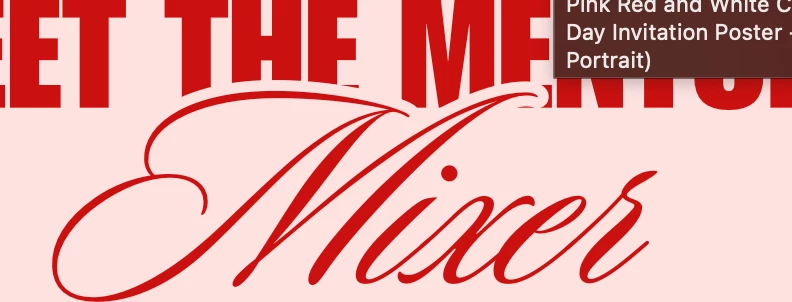
How can I replicate this effect?
  • January 16, 2025
  • 2 replies
  • 381 views


In my design, which is intended to replicate this exactly, "Mixer" is in front of the other text. I then tried to just add a strong stroke in the light pink color. While that theoretically works, it begins eating into the text's fill too much. By the time the stroke matches its size, there's no more dark red left and you can no longer read the word.

Correct answer Jacob Bugge

Garbageware,


In addition to what Monika said, you can make the solution more flexible/versatile by setting the Opacity of the New Stroke beneath the text to 0% in the Transparency palette, then select both the Mixer and the rest and Ctrl+G to Group them, then also in the Transparency palette tick the Knockout Group box so that/until the tick mark is full and the New Stroke knocks out, in other words hides, the text parts beneath it so the background colour shows through.


With this, you can freely change the background colour and still have the knockout instead of your having to change the stroke colour to match the new one (each time).


2 replies

Jacob Bugge
Community Expert
Jacob BuggeCommunity ExpertCorrect answer
Community Expert
January 16, 2025

Garbageware,


In addition to what Monika said, you can make the solution more flexible/versatile by setting the Opacity of the New Stroke beneath the text to 0% in the Transparency palette, then select both the Mixer and the rest and Ctrl+G to Group them, then also in the Transparency palette tick the Knockout Group box so that/until the tick mark is full and the New Stroke knocks out, in other words hides, the text parts beneath it so the background colour shows through.


With this, you can freely change the background colour and still have the knockout instead of your having to change the stroke colour to match the new one (each time).


Participant
January 24, 2025

That also works. Thank you!

Jacob Bugge
Community Expert
Community Expert
January 24, 2025

You are welcome, Garbageware.


Monika Gause
Community Expert
Community Expert
January 16, 2025

Delete the stroke from the text.

Instead select the text object with the selection tool (just click once)

Open the appearance panel

Apply a new stroke to the text object

Move it below the "Characters"

color, stroke weight, etc.

Participant
January 24, 2025

That worked. You're the best!