Known Participant
September 20, 2017
Answered

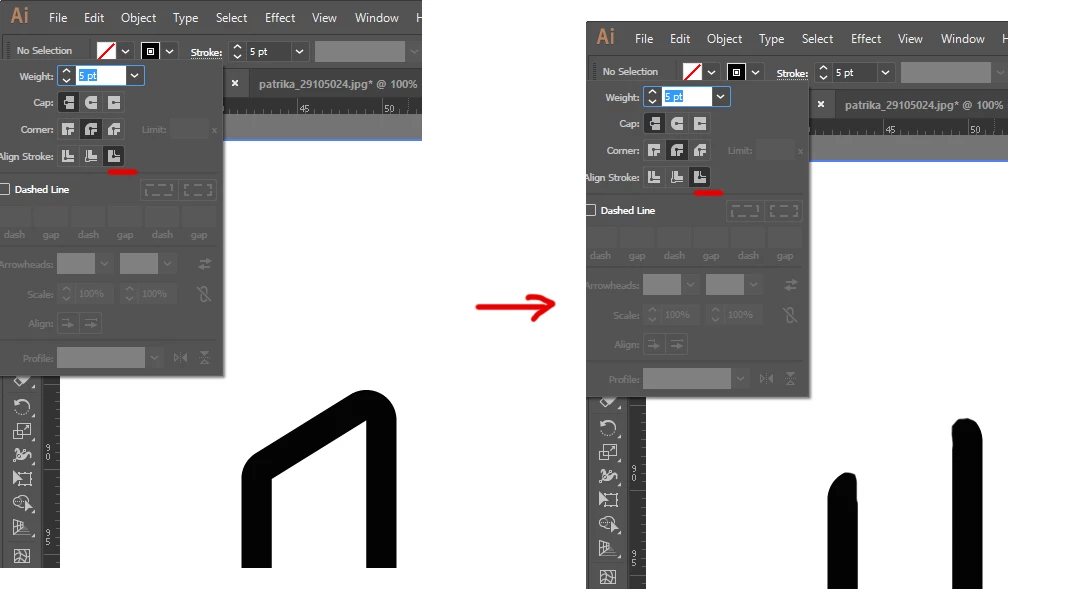
?! How can this be done ?!

  • September 20, 2017
  • 2 replies
  • 627 views

How can this be done?

    This topic has been closed for replies.
    Correct answer Mike_Gondek10189183

    As already mentioned align stroke to inside or outside only works on closed path.

    You could drag a copy on top and remove the black stroke, and keep a fill of white.
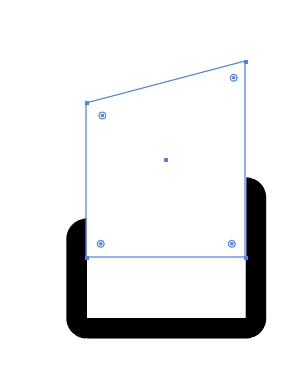
    If you need transparency use outline stroke and pathfinder.

    2 replies

    Legend
    September 21, 2017

    The only time the Align Stroke options are available is when the shape is closed - otherwise, Illustrator does not see an "inside" and "outside" to align with. 

    Offhand, I suggest using Outline Stroke, and then removing the upper part. You will have to add the rounded edges separately (maybe with couple of circles aligned with the tops of the strokes)

    Monika Gause
    Community Expert
    Community Expert
    September 21, 2017

    Ah, OK, I understand.

    Use the width tool to create a variable width  profile which is aligned to one side of the object.

    michelew83603738
    Community Expert
    Community Expert
    September 20, 2017

    You need to have a closed path for the last two options on the stroke to be available - is that what you are trying to do? Once you delete a side of your object, by default, it will revert back to align to middle.

    Known Participant
    September 21, 2017

    I want to remove the upper part

    Monika Gause
    Community Expert
    Community Expert
    September 21, 2017

    Please show the outline view of that artwork.