


rudysfire
Participant
Jan 31, 2025 4:25 PM UTC
Answered

How Do I add Decimal Points in Illustrator 2025 Document Setup?

How Do I add Decimal Points in Illustrator 2025 Document Setup?


A client needs a document size of 3.625 inches wide. I don't know how to add the third decimal point to the document in order to achieve this, and end up having to choose between 3.62 and 3.63 in document size.

 

Anna_Lander
Anna_LanderCorrect answer
Community Expert
Jan 31, 2025 5:22 PM UTC

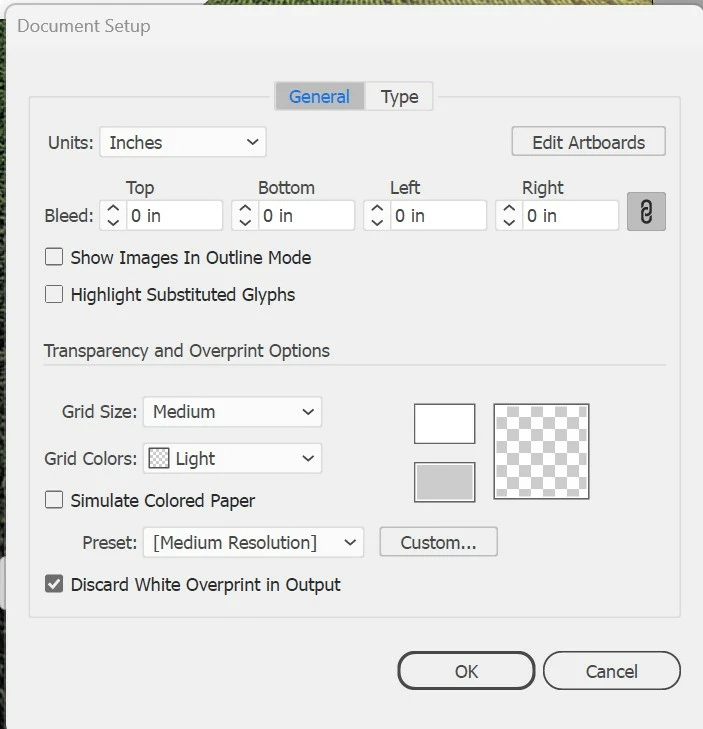
Here there are fields for Bleed (an extra space for safe crop of printed docs) and measure units (e.g. inches).
Then you can select an Artboard tool and set the needed page size with any amount of decimal points.

2 replies

Anna_Lander
Community Expert
Anna_LanderCommunity ExpertCorrect answer
Community Expert
Jan 31, 2025 5:22 PM UTC

Here there are fields for Bleed (an extra space for safe crop of printed docs) and measure units (e.g. inches).
Then you can select an Artboard tool and set the needed page size with any amount of decimal points.

Translate
rudysfire
rudysfireAuthor
Participant
Jan 31, 2025 8:04 PM UTC

Oh, thank you so much, perfect!!! 

Translate