
Participant
December 18, 2020
Answered

How do I angle text while keeping the vertical lines at 90*?

  • December 18, 2020
  • 3 replies
  • 526 views

I included a photo that shows what I am trying to replicate. On the left, the letter's horizontal edges match the angle of the rectangle's horizontal edges but the vertical edges of both stay at a 90* angle.


How do I do the same to the text on the right?


I tried to use the Direct Selection Tool and distorting but these don't seem to get what I am looking for.
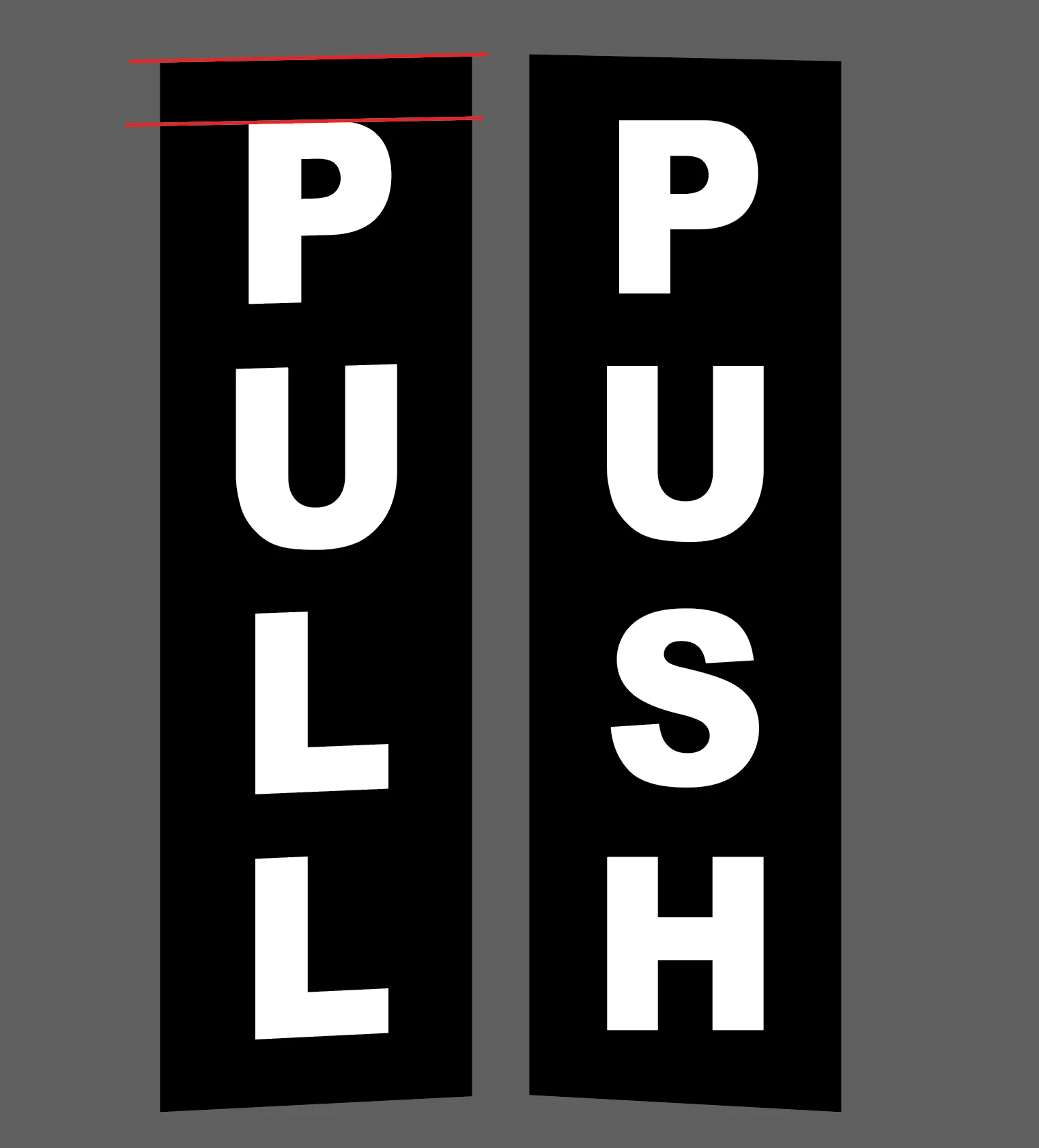


[ attachment inserted as inline image by moderator ]

This topic has been closed for replies.
Correct answer lambiloon

Hi i think skew command can help you for this check for it....regards

3 replies

barbara_a7746676
Community Expert
Community Expert
December 18, 2020

The Shear tool would do it.

lambiloon
Community Expert
lambiloonCommunity ExpertCorrect answer
Community Expert
December 18, 2020

Hi i think skew command can help you for this check for it....regards

Ali Sajjad / Graphic Design Trainer / Freelancer / Adobe Certified Professional
Monika Gause
Community Expert
Community Expert
December 18, 2020

Please embed screenshots in your post instead of attaching them, Thank you.