
jilltrujill
Participant
July 28, 2017
Answered

How do I bend a 3d extruded cylinder in illustrator?

  • July 28, 2017
  • 3 replies
  • 6368 views

I made a cylinder in illustrator by extruding a circle. pretty simple. but I want to bend it just a little bit so that it is curved. How do i go about doing that? nothing seems to be working?
    This topic has been closed for replies.
    Correct answer Monika Gause

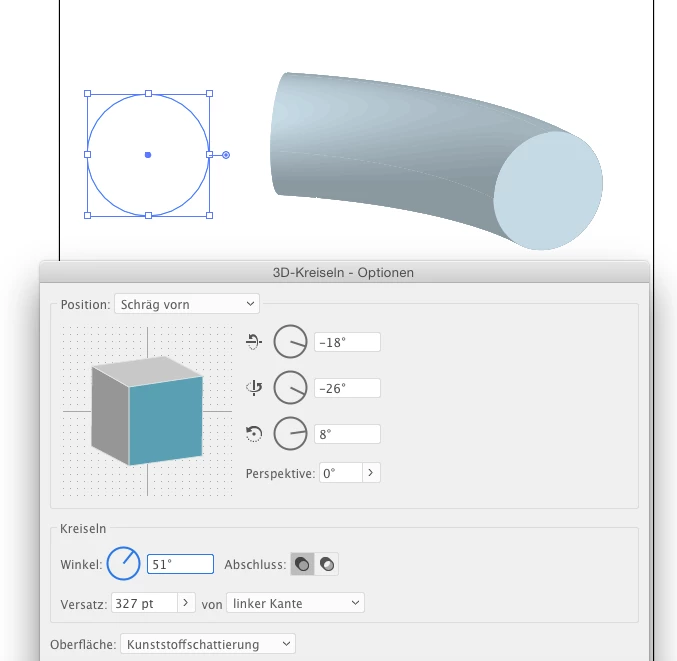
    STart with a circle and then use the 3D rotate effect:

    3 replies

    eliyah
    Known Participant
    June 17, 2021

    not sure about illustrator but i am playing around with it in photoshop right now, and if you make a cilinder line from a circle there by using - 3d, i think shape preset Bend X 360 right, while in "deform" (in the top menu of the properties) you put exrusion depth on low or however you need (play with it), then you have there horizontal angle - that makes it bend horizontaly (and vertical angle vertically (which makes it into sort of a spiral, which is cool 🙂 )

    eliyah
    Known Participant
    June 17, 2021

    no it was " Bend X 180 right", this way it wont be a full circle (which 360 means)

    Monika Gause
    Community Expert
    Monika GauseCommunity ExpertCorrect answer
    Community Expert
    July 28, 2017

    STart with a circle and then use the 3D rotate effect:

    Inspiring
    July 29, 2017

    Could you do that step-by-step, Monika. I haven't followed.

    1. Start with circle.

    2. Apply 3D Rotate Effect first?

    3. Then apply 3D Extrude and Bevel?

    Thank you.

    Monika Gause
    Community Expert
    Community Expert
    July 29, 2017

    You don't need extrude and bevel at all.

    But you need to set the distance in the rotate dialog.

    Benjamin Root
    Legend
    July 28, 2017

    Moved from Photoshop General Discussion to Illustrator where you'll get better responses

    Benjamin