Participant
October 16, 2012
Answered

How do I bring back my tools panel?

  • October 16, 2012
  • 10 replies
  • 417136 views

Hello,

When I had Illustrator open, I moved my Mac's view to the widgets desktop. When I went back to the desktop that had Illustrator, the tools panel and other panels were missing. I went back to the widgets desktop and the panels were there!

I could not figure out how to get them back over to the correct desktop, so I closed them. Now, back in Illustrator, I can't figure out how to open them up again.

I'd like to go back to the default setting. Please help!

Thanks and God bless,

Scott Miller

    Correct answer Sheena Kaul

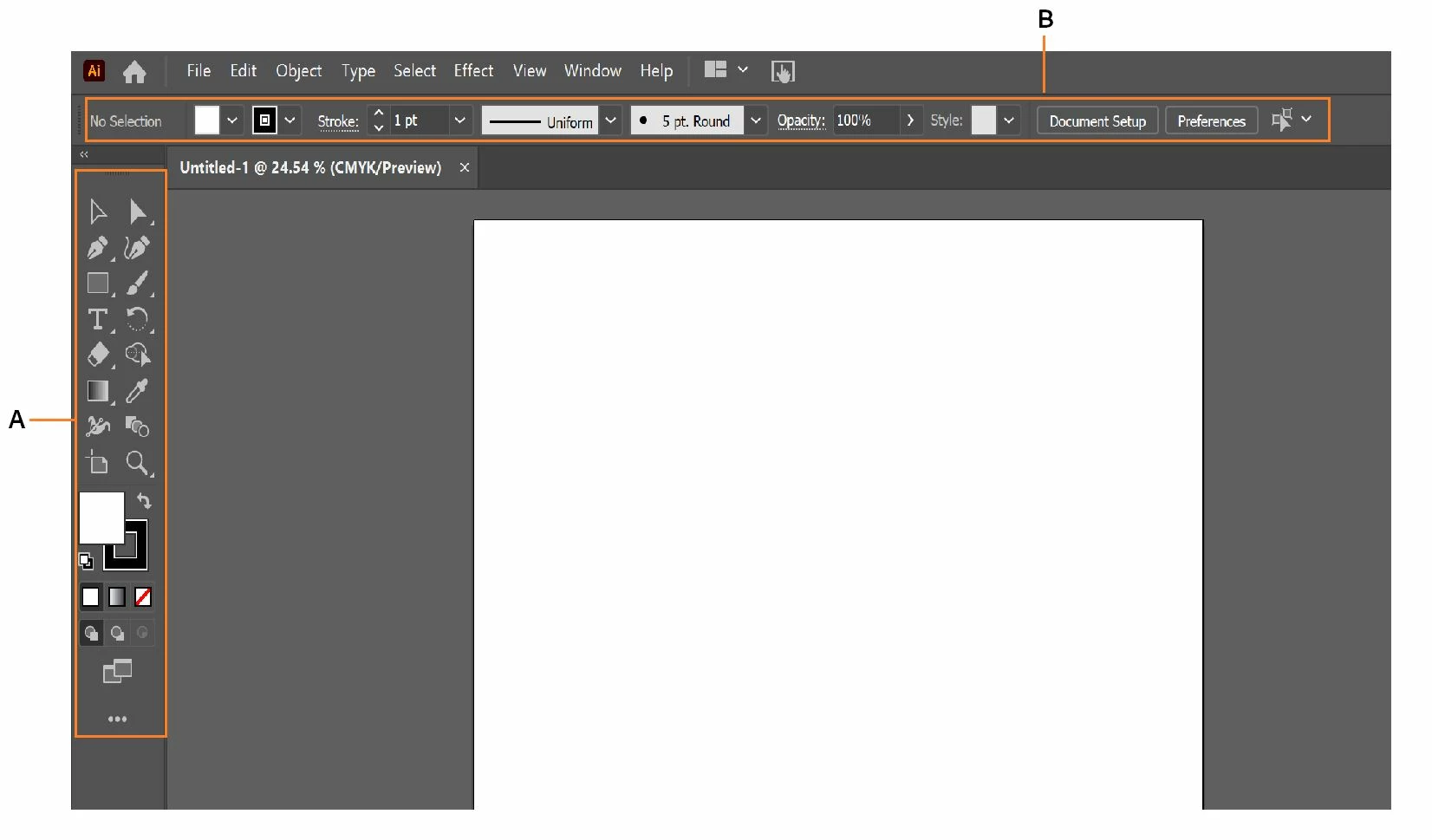
    To view the Illustrator toolbar, do the following:

    Select Window > Workspace > Reset XXX (XXX = Name of the workspace you’re using). 


    To view the top control bar, select Window > Control to display it on the screen.  


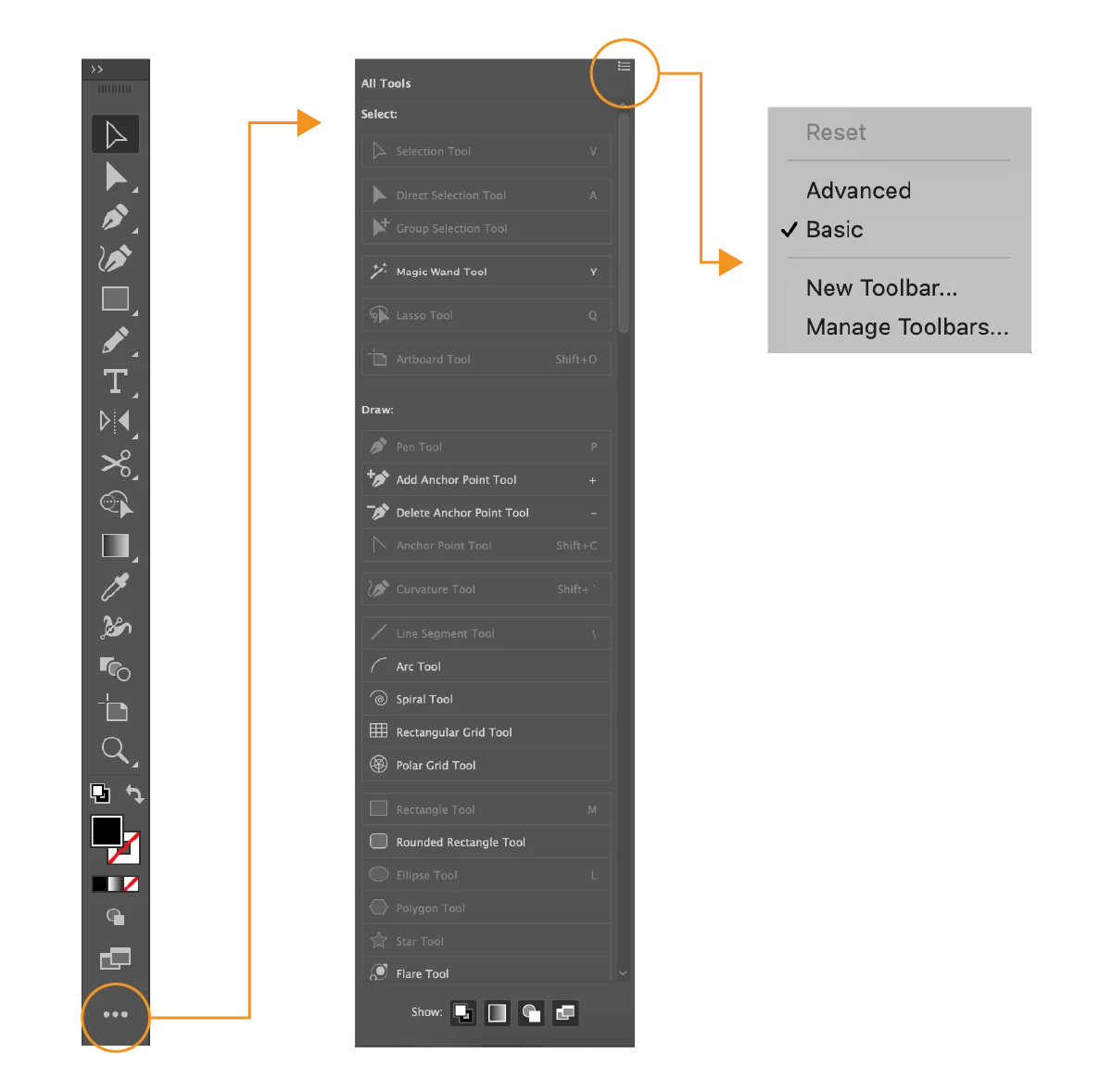
    If you are unable to see a specific tool, please try the steps below until the issue is resolved: 

    1. Select Window > ToolbarAdvanced . 
    2. Click the ellipsis (…) at the end of the toolbar. 
    3. Click the list icon in the top right corner. Select Reset from the menu or select from the Advanced or Basic toolset. 


    Also, try resetting preferences. 


    For more assistance, reply to this post providing sufficient information to reproduce your issue. Screenshots will be greatly appreciated.


    10 replies

    Sheena Kaul
    Community Manager
    Sheena KaulCommunity ManagerCorrect answer
    Community Manager
    April 29, 2021

    To view the Illustrator toolbar, do the following:

    Select Window > Workspace > Reset XXX (XXX = Name of the workspace you’re using). 


    To view the top control bar, select Window > Control to display it on the screen.  


    If you are unable to see a specific tool, please try the steps below until the issue is resolved: 

    1. Select Window > ToolbarAdvanced . 
    2. Click the ellipsis (…) at the end of the toolbar. 
    3. Click the list icon in the top right corner. Select Reset from the menu or select from the Advanced or Basic toolset. 


    Also, try resetting preferences. 


    For more assistance, reply to this post providing sufficient information to reproduce your issue. Screenshots will be greatly appreciated.


    Participant
    June 2, 2020

    Printfusion45 That is a TERRIBLE answer!

    Now the CORRECT answer... Window>Toolbars>Advanced

    Monika Gause
    Community Expert
    Community Expert
    June 2, 2020

    "Printfusion45 That is a TERRIBLE answer!"


    That was the correct answer in 2012!

    If you go digging up old threads, please get informed about how things were working in 2012.


    verdevice
    Participant
    October 16, 2019

    Hello,

    Go to Windows> Tools and then click on to Default option. 

    Now you are back to your default setting. 

    jerreflorc3168994
    Participant
    November 23, 2017

    thanks for the info

    yub57947480
    Participant
    September 11, 2017

    Good job !

    September 7, 2016
    fredericke3885029
    Participant
    April 3, 2016

    Go to Window > Tools > Default Side Bar

    (this is how it is on Mac, sorry, but I am not sure about how to do it on Windows)

    starsforluna
    Participant
    October 24, 2015

    Is there a way to bring it back without resetting your whole workspace?

    rcraighead
    Legend
    October 24, 2015

    "Tools>Default"

    You can also hit "Tab" to hide/show all floating panels, or "Shift+Tab" to hide/show all BUT the Tools Panel.

    Participant
    July 18, 2015

    i am having the same issue at the moment, i can not get the side bar on the left (with all the tools) on illustrator back down. i know its the layout of how its set up but i don't not how to set it up and get it back! any help?

    Monika Gause
    Community Expert
    Community Expert
    July 18, 2015

    Have you already tried resetting the workspace?

    Known Participant
    July 28, 2015

    I had the same problem today after updating Illustrator CC 2015.  I tried resetting Essentials, but the layout panes simply flicker for a second (resetting) and then nothing happens (i.e. no palettes show up, and pressing F7, etc, does nothing).


    The only way to access any of the palettes is to select a workspace other than "Essentials" (i.e. "Essentials" is essentially gone).

    PrintFusion45
    Participating Frequently
    October 16, 2012

    @scottm777, From the top right corner of Illustrator, click on Essentials > Reset essentials. This should bring back all your tools and panels.

    Westopherguy
    Participant
    October 16, 2012

    I can't believe how often I do some weird (wrong) keystroke, and end-up hiding or closing stuff. Always takes me 10 minutes to figure out how to get stuff back. This is way easier... Will have to remember that one.  ;-)

    Known Participant
    December 12, 2017

    Something happened (I hit god-knows-what-key) and all my tools disappeared. I had to stop everything to find a forum to come up with the solution. This is what I hate about Illustrator--everythingg is so darned counter-intuitive! "Adobe Frustrator" would be a better name for this app.