

How do I change the colour of a line of text generated by a .JSX script run in illustrator?
Hi There,
I am running a script in illustrtor to automate some functrions. One of the functions is to label a process based on a selection made in a drop down menu of the script. The problem is, we are rebranding and therefor changing colours and logo on the documents this script will make.
Print Process Process
var Color=function(){
var c = new CMYKColor;
c.cyan=0; c.magenta=100; c.yellow=100; c.black=0; return c;
}();
templateObject.firstLevelLayers.fluff_layer.locked=false; templateObject.firstLevelLayers.fluff_layer.visible=true;
templateObject.fluff_elements.printProcess.hidden=false;
var processText=templateObject.fluff_elements.printProcess.contents;
templateObject.fluff_elements.printProcess.contents =
processText.replace(processText.substr(processText.lastIndexOf(": ")+1,)," "+userInput.printingProcess);
templateObject.fluff_elements.printProcess.name = templateObject.fluff_elements.printProcess.contents;
for(c=0; c<templateObject.fluff_elements.printProcess.contents.length; c++){
if(c>14){
templateObject.fluff_elements.printProcess.textRange.characters[c].characterAttributes.fillColor=redColor;
}
This line of code here is what I have found which i believe controls this text I need to change the colour of.
I have tried to change the cmyk values here, but this produces the error as follows. 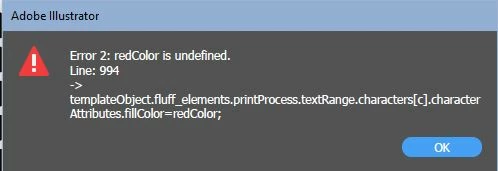
Any help would be appreciated!
Thanks
 AdChoices