Participant
August 20, 2013
Answered

How do I change the number of undos in Illustrator CS6?

  • August 20, 2013
  • 2 replies
  • 29497 views

I used to have what seemed like unlimited undo's in Illustrator CS6 for Mac. In the last few days all I can do is six?!? How do I change this, please help!

This topic has been closed for replies.
Correct answer Mike_Gondek10189183

You should have 200 undos, and can verify this in the bottom left flyout >> show >> number of undos (this show shows many undos you have cahced, not your max amount, will max out at 200)
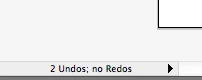
You can try changing the 200 in the illustrator preferences, by using a text editor, saving and then booting illustrator. Not sure this is a great idea, as 200 should be plenty, but let us know your results if you try.

/undoDepth 5

/maxUndoDepth 200

Older versions of Illustrator let you change this in the preferences, but they must have decied that hitting CMD Z more than 200 times is not a good way to spend your afternoon.

2 replies

Liggliluff
Participant
August 25, 2017

Adobe Photoshop allows 1000 undos, and Illustrator should allow at least that amount too.

Om Nath Jha
Legend
August 31, 2017

Hi there,

As suggested above, you can change that in the preferences. The default value is 200. If you want, you can also share a feature request here: Adobe Illustrator Feedback

Regards,

Om

Mike_Gondek10189183
Community Expert
Mike_Gondek10189183Community ExpertCorrect answer
Community Expert
August 20, 2013

You should have 200 undos, and can verify this in the bottom left flyout >> show >> number of undos (this show shows many undos you have cahced, not your max amount, will max out at 200)

You can try changing the 200 in the illustrator preferences, by using a text editor, saving and then booting illustrator. Not sure this is a great idea, as 200 should be plenty, but let us know your results if you try.

/undoDepth 5

/maxUndoDepth 200

Older versions of Illustrator let you change this in the preferences, but they must have decied that hitting CMD Z more than 200 times is not a good way to spend your afternoon.

DutchOzAuthor
Participant
August 20, 2013

Sorry, I have no idea how to create a script, or where to save it to.

What's frustrating is that it used to be (around) 200. But I have no idea what caused it to change to 6.

Doug A Roberts
Community Expert
Community Expert
August 21, 2013

open this file in a text editor (windows):

Users\<user name>\AppData/Roaming\Adobe\Adobe Illustrator CS5 Settings\en_US*\AIPrefs

search it for 'maxundodepth'

see what's there

change it (maybe)

save and restart illustrator.