tamaraawad
Participant
April 29, 2017
Answered

How do I change the opacity on the stroke ONLY and vise versa?

  • April 29, 2017
  • 1 reply
  • 50492 views

Hi,

How do I change the opacity of the stroke ONLY or how do I change the opacity of the fill color ONLY?

Best,

Tamara

    Correct answer Larry G. Schneider

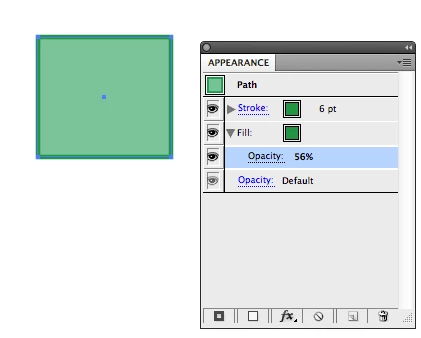
    The Appearance panel can be used to change the Opacity of an individual stroke or fill. Just turn down the arrow to the left of Stroke/Fill to access the Opacity.
    1 reply

    Larry G. Schneider
    Community Expert
    Larry G. SchneiderCommunity ExpertCorrect answer
    Community Expert
    April 29, 2017

    The Appearance panel can be used to change the Opacity of an individual stroke or fill. Just turn down the arrow to the left of Stroke/Fill to access the Opacity.

    tamaraawad
    Participant
    April 29, 2017

    Hi,

    But for some reason it changes the opacity of both the fill and the stroke and I just want to change to opacity of the fill, and not the stroke.

    Best,

    Tamara

    29 apr. 2017 kl. 18:28 skrev Larry G. Schneider <forums_noreply@adobe.com<mailto:forums_noreply@adobe.com>>:

    How do I change the opacity on the stroke ONLY and vise versa?

    created by Larry G. Schneider<https://forums.adobe.com/people/LarryG.Schneider> in Illustrator - View the full discussion<https://forums.adobe.com/message/9485494#9485494>