Participant
April 19, 2018
Answered

How do i convert english numbering and alphabets to arabic?

  • April 19, 2018
  • 1 reply
  • 1715 views

How do i convert enlish numbering and alphabets to arabic? Im using adobe illustrator adobe cc2018 version. There is no digits option in charater tab available. Please helpg

    This topic has been closed for replies.
    Correct answer Lhemz0527

    The common numbers in English is Hindu-Arabic or Arabic in llustrator(12345...)

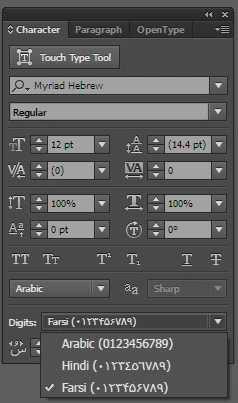
    The number used in Arabic language is Indic-Arabic or either Farsi or Hindi in Illustrator (١٢٣٤٥٦٧٨٩٠)

    Here are the requirements:

    • Your illustrator installer version should be the English(Israel) or English (UAE), this is just done by changing the language before downloading the installer from Creative Cloud
    • In Windows, you should install additional language, Arabic, including the keyboard layout. If you don't have an Arabic keyboard, you should be familiar with the mapping of Arabic characters once you activate the language in the system (i.e. Windows)

    In Illustrator, There are two steps.

    • Set the digits in the Character panel:
    • In Preferences -> Advance Type. Set or check Use Native Digits when typing in Arabic Scripts

    1 reply

    Lhemz0527Correct answer
    Participating Frequently
    April 19, 2018

    The common numbers in English is Hindu-Arabic or Arabic in llustrator(12345...)

    The number used in Arabic language is Indic-Arabic or either Farsi or Hindi in Illustrator (١٢٣٤٥٦٧٨٩٠)

    Here are the requirements:

    • Your illustrator installer version should be the English(Israel) or English (UAE), this is just done by changing the language before downloading the installer from Creative Cloud
    • In Windows, you should install additional language, Arabic, including the keyboard layout. If you don't have an Arabic keyboard, you should be familiar with the mapping of Arabic characters once you activate the language in the system (i.e. Windows)

    In Illustrator, There are two steps.

    • Set the digits in the Character panel:
    • In Preferences -> Advance Type. Set or check Use Native Digits when typing in Arabic Scripts