Participant
February 3, 2020
Answered

How do I copy a page of Artwork including all the layers

  • February 3, 2020
  • 6 replies
  • 1511 views

How do I copy a page from a document to add extra pages but to copy all the page layout so I can just change the text? 


I have copied a page of artwork but the page is blank?

This topic has been closed for replies.
Correct answer John Mensinger

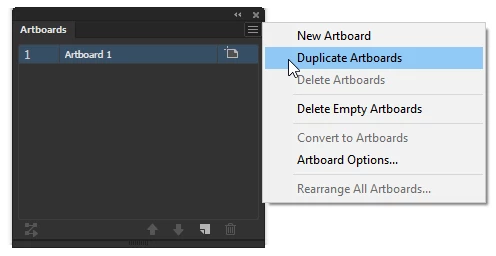
Choose Duplicate Artboards from the Artboards panel menu...
6 replies

pixxxelschubser
Community Expert
Community Expert
February 3, 2020

Please show us a screenshot from your Illustrator window with activ Artboard tool.

pixxxelschubser
Community Expert
Community Expert
February 3, 2020

Did you check the button in the Command Bar like mentioned in my screenshot #1

Participant
February 3, 2020

Yes 

pixxxelschubser
Community Expert
Community Expert
February 3, 2020

Use the Artboard tool and check "Move Artboard with Artwork" (I don't know if this is the correct english term for that)


Done


Have fun

😉

Participant
February 3, 2020

I did that but I just get a blank art board with no content? What am I doing wrong?

John Mensinger
Community Expert
John MensingerCommunity ExpertCorrect answer
Community Expert
February 3, 2020

Choose Duplicate Artboards from the Artboards panel menu...

Participant
February 3, 2020
Where do I find that menu pls

Get Outlook for iOS
John Mensinger
Community Expert
Community Expert
February 3, 2020

It's the Artboards panel menu, as shown in my post.


To show the Artboards panel, choose Window > Artboards.

Participant
February 3, 2020

I am trying to copy an artboard of content to make copies

Kind regards

Charmaine


[ private informations removed by moderator for security reasons ]

chanaart
Community Expert
Community Expert
February 3, 2020

Illustrator does not have pages. It is Artbords. Are you talking bout Artboards or Page in Indesign?