
Jim_Palik
Inspiring
April 27, 2021
Answered

How do I copy objects on one layer to another layer

  • April 27, 2021
  • 2 replies
  • 1869 views

I am a CC member using the latest Illustrator. I am relearning after a long absence.

I need to copy all of the rectangles on one layer to a second layer. I do not want to move them. I will then add photographs to each rectangle on the secon layer. The top layer will be used to produce the holes for a matt and the second layer will be used for printing the photographs so that the align perfectly to the mat.

I will ultimately create 35 different layouts.

How do I do this.

I look forward to you answer. Jim
This topic has been closed for replies.
Correct answer Doug A Roberts

Select the objects you wish to move.

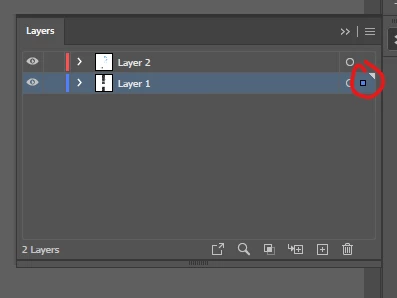
In the layers panel, alt-click on the little coloured square to the right of the layer name, hold and drag to the intended layer. You should now have a set of the selected objects on each layer.

2 replies

Doug A Roberts
Community Expert
Doug A RobertsCommunity ExpertCorrect answer
Community Expert
April 27, 2021

Select the objects you wish to move.

In the layers panel, alt-click on the little coloured square to the right of the layer name, hold and drag to the intended layer. You should now have a set of the selected objects on each layer.

LinSims
Community Expert
Community Expert
April 27, 2021

Let me move this to the Illustrator forum for you, which is the appropriate forum for your question.

The Using the Community forum is for help in using the Adobe Support Community forums, not for help with specific programs. Product questions should be posted in the associated product community.