Inspiring
July 28, 2020
Answered

How do i create a sub layer that show up on the bottom instead of the top? and...

  • July 28, 2020
  • 1 reply
  • 799 views

2 questions.


1. How do i create a sub layer that show up on the bottom instead of the top? 


2. How do I create a top layer that will show up on the bottom instead than the top? 


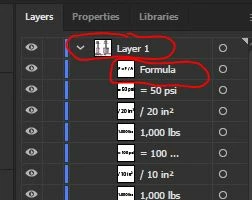
See picture blow.


On the layers panel I have a sub layer called "formula". What if I want to keep creating objects and I want the layers to be created below the rest of sub-layers instead of the top of the sub-layers?    Certain items I have to be re-arraging the work because the items I want them to show up below.


There is a top later called "layer 1".  How can I create a second top "layer 2" and automatically create it on top or bottom? 


This topic has been closed for replies.
Correct answer Myra Ferguson

On this page, of the help, set the drop-down menu to the Layers panel. You'll find a bunch of shortcuts that should help:


Place layer at top of layer list

Ctrl-click New Layer button

Command-click New Layer button

Place new sublayer at bottom of layer list

Ctrl + Alt-click New Sublayer button

Command + Option-click New Sublayer button


1 reply

Myra Ferguson
Community Expert
Myra FergusonCommunity ExpertCorrect answer
Community Expert
July 28, 2020

On this page, of the help, set the drop-down menu to the Layers panel. You'll find a bunch of shortcuts that should help:


Place layer at top of layer list

Ctrl-click New Layer button

Command-click New Layer button

Place new sublayer at bottom of layer list

Ctrl + Alt-click New Sublayer button

Command + Option-click New Sublayer button