
April 28, 2022
Answered

How do I create this colorful background

  • April 28, 2022
  • 3 replies
  • 690 views

I was scrolling through google for inspiration and found a poster I want to reccreate. How do I get the confetti-like background?

This topic has been closed for replies.
Correct answer DougKatz17096006

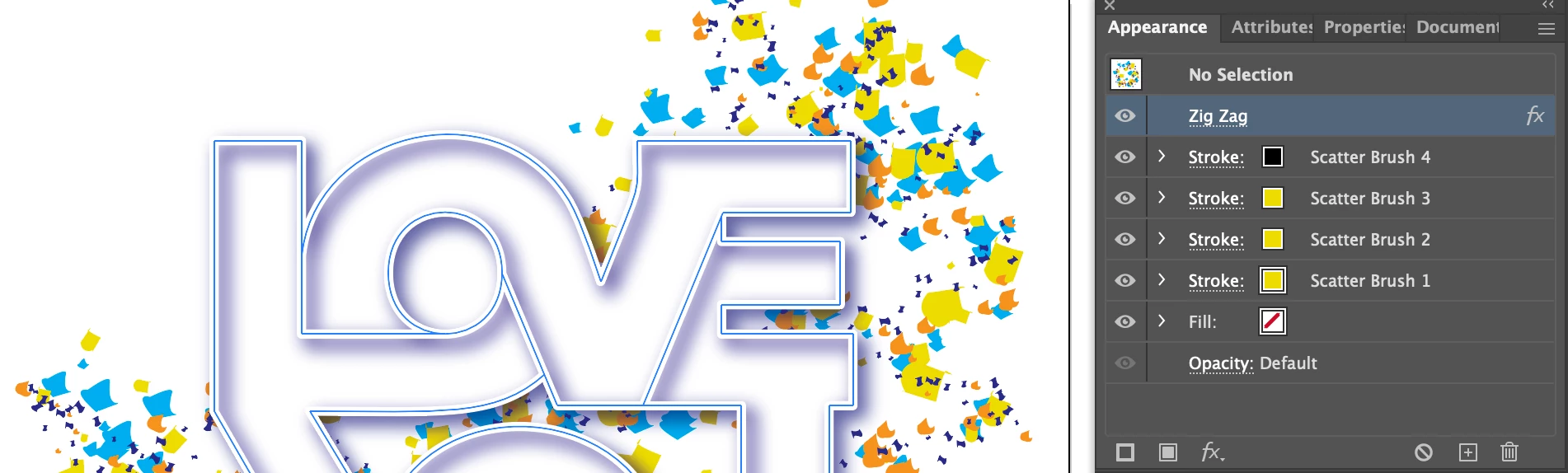
This is made with multiple scatter brushes applied to a freeform path. A Zig Zag effect is applied to the path.


3 replies

Monika Gause
Community Expert
Community Expert
April 29, 2022

I once did a similar kind of design.


Cut out colored pices of paper and put them on my scanner. The scattered parts of that around in the design.

For yours if you get the arrange right on the scanner, then editing it afterwards migh noch be necessary.

You could scan several different ones, then stack them in Photoshop and add different blurs to them to simulate depth.

It could help to scan them with a color background already in place. Even if you remove that background later when editing, it gives the confetti the correct color along the fringes.


Also put the logo on it, then add some bits in front of it.

Kurt Gold
Community Expert
Community Expert
April 28, 2022

As Jacob already alluded, you may use one of the various scripts that can do random distributions of a given selection that consists of different shapes or symbol instances.


Also, Illustrator does offer a couple of ways to randomly distribute things (for example Transform Each, Scatter Brushes or the built-in Symbol tools).


Another funny but useful way would be to buy a packet of confetti (or do the confetti yourself), throw it wildly into the air in front of a single-coloured background and have a good photographer that is able to capture the confetti fireworks. Then you may use that photo as your background. A little bit of luck, and the photographer way may be the most convincing approach.


DougKatz17096006
DougKatz17096006Correct answer
Inspiring
April 29, 2022

This is made with multiple scatter brushes applied to a freeform path. A Zig Zag effect is applied to the path.


Kurt Gold
Community Expert
Community Expert
April 29, 2022

Very nice to see that you are still there and alive, Doug.


Due to some kind of forum bug one cannot enlarge your attachment at the moment, but even the small preview shows that it is a very good approach.


Sometimes Illustrator's capabilities to randomise things are a bit underrated and more often than not it is assumed that one definitely needs a script, but often no script is required at all, just some insight about the possible built-in ways.


Jacob Bugge
Community Expert
Community Expert
April 28, 2022

v,


As I (mis)understand it, you wish to have what is more or less termed a spray of (more or less) random symbols/shapes.


It can take a lot of time to make such a mess, but I believe there are scripts to easily spray random symbols from a larger set.