



Supernaut63
Known Participant
February 5, 2026
Question

How do I create this custom stroke for my drawing?

  • February 5, 2026
  • 2 replies
  • 21 views

Hey all,

Got a question. I’ve been drawing in Illustrator since the 1980’s, but am not up-to-speed on creating custom strokes, as I rarely ever have a need for them. Anyway, I currently have 78 floor plans to draw and more them half of them have this really funky/curvy balcony/terrace wall that is a bear to draw, and slowing me way down on getting these things cranked out. What I am wondering is if there is a way to create a custom stroke so that I can draw this wall with one vector line? This outer Terrace wall is what I am talking about…...and I’d also love to figure out a way to easily draw the curvy WINDOW wall with it’s little custom-placed sectional dividers if that’s possible. If you all can give me step-by-step advice that would be great. I normally would just draw these things without worry, but I have 78 of them to do and I need a quicker way of drawing these walls.
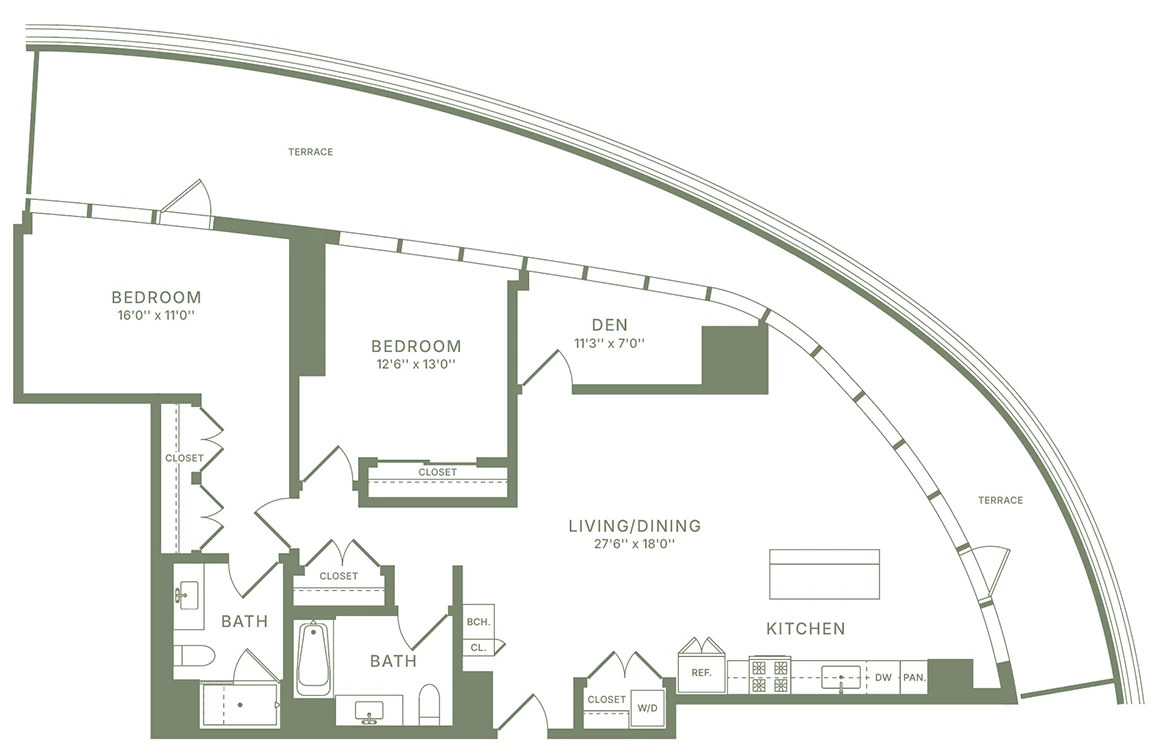
 

    2 replies

    Monika Gause
    Community Expert
    Community Expert
    February 6, 2026

    The window thing - the vertical dividers are not supposed to have a variable width, right? So a dashed stroke will not work, right?


    You could use a pattern brush. two horizontal lines, one vertical. Then drag into the brushes panel, make a pattern brush. In order to have them in the exact distance, what you can do is use dashes on top of that. So make that a dashed stroke with the dash being as long as the distance from windoe to window and the gap being 0


    Kurt Gold
    Community Expert
    Community Expert
    February 5, 2026

    You may create custom Art Brushes and/or Pattern brushes.


    Another (advanced) way would be using multiple strokes via Appearance panel.


    For example, you can take something like this as an Art Brush element and apply the brush to your paths for the terraces:


    You just draw that, go to the Brushes panel, create a new Art Brush there and check the options in the Art Brush Options dialog.


    For the Window wall you may take something like this as a Pattern Brush element:


    You would create the Pattern Brush in the Brushes panel as well. Some tweaking may be required, of course.

    Supernaut63
    Known Participant
    February 6, 2026

    I figured out how to do the outer Terrace wall. I found a good video on YouTube. I had to just take a part of the existing Terrace wall and create a new brush with it. It’s been ages since I worked with Brushes, so I just needed a reminder. The problem with the window wall? Those little dividers are going to move on every drawing, so they will constantly be spaced differently. I don’t know the solution to that. For now, I’ve been dropping the dividers in manually which is a PITA.