
Participant
July 25, 2018
Question

How do I create Warped arc text in Adobe Illustrator with better symmetry?

  • July 25, 2018
  • 3 replies
  • 2691 views

Hi,

When I create warped arc text using the AI warp tool, it never seems to have great symmetry. Take a look at this example:
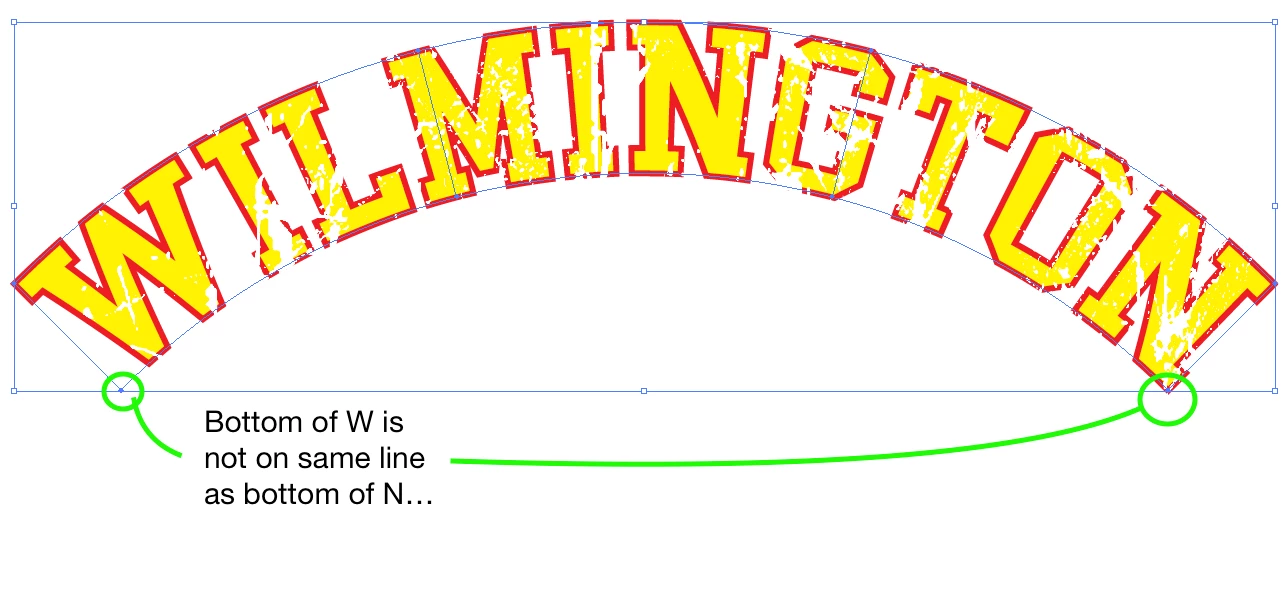
To me, this graphic does not look symmetrical. The graphic looks pushed to the right. It seems Adobe Illustrator aligns the graphic with the top of the W, and the top of the N on the Y-axis.

Is it possible to align the curve based on the bottom of the W and the bottom of the N on the X-axis? Is there a quick setting/fix for this?

If not, how do I make this graphic seem more in align?

Any help is much appreciated.

Thank You.

Wyatt

This topic has been closed for replies.

3 replies

kphotopage
Legend
July 25, 2018

My first choice would be to create Text on a Path. (Curved Path).

Text is centered aligned.

Then with your Black arrow, you can manually adjust how you want the characters to realign.

K

Jacob Bugge
Community Expert
Community Expert
July 25, 2018

Wyatt,

What looks right is right.

I am afraid that if you align the curve based on the bottom of the W and the bottom of the N on the X-axis, the graphic will look pushed to the left.

I believe you will need a more balanced, preferably iterative, approach.

You may try this:

With the original WILMINGTON created with Paragraph>Align center of course, you may reflect across Vertical on top of itself (coinciding Bounding Boxes), then Group, then apply the Arc, then hide the mirror text, and see.

Undo is your friend, and you may use a few lines (Line (Segment) Tool) to see the horizontal level of the tops and bottoms of the W and N; but ultimately, it is the visual appearance of the arced text itself that matters. You can, if you must, unhide then Object>Expand Appearance and delete the mirrored text to get uneditable/unchangeable outlined text, but then there is no way of going back and removing the effect and redoing (unless you keep a copy of the original ready at hand).

You may move the mirror text (to the right) to see whether you get a(n even) better visual fit.

Edit: Cross posting.

I believe the mirroring (without adjustment) and hiding the mirror part is the closest you can get to a more automated way, possibly running (part of) it as an Action/Script. Maybe Kurt or Carlos or Theunis has a suggestion, or you can ask over here,

Illustrator Scripting

As you have seen, the difference in shape at the ends (in most cases) will call for an intervention, so something has to be done.

Monika Gause
Community Expert
Community Expert
July 25, 2018

Add a helper object on the right side.

Then warp.

Then expand and delete the helper object.

Of course Illustrator uses the bounding box to warp this, because it cannot judge anything else.

Participant
July 25, 2018

Hi,

Is there a way to automate this without human intervention?  I'm hoping to create perfect symmetrical text arcs for thousands of phrases using data-driven graphics. 

Any help is much appreciated.