Participant
September 19, 2017
Answered

How do I Delete a saved Brush Library on the User Defined Library on Illustrator?

  • September 19, 2017
  • 3 replies
  • 5260 views

I've accidentally saved the same brushes file twice to my User Defined Library - the easiest thing ever - but I can't figure out how to delete one of them!!

My illustrator version is 21.1.0 / I'm using a Mac / thanks in advance for your help!
This topic has been closed for replies.
Correct answer Debbie Keller

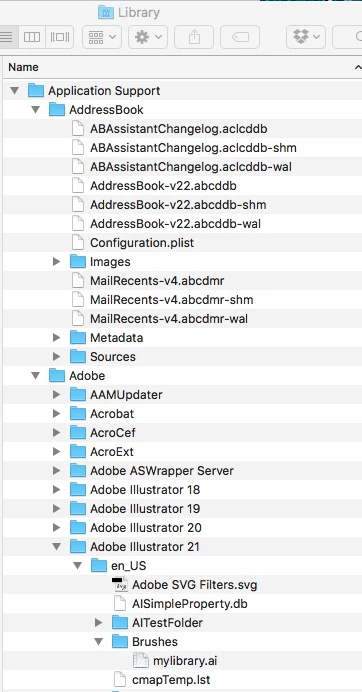
You will need to go to your Library folder, if you go to the Brush Libraries Menu and choose Save Library you will see the path to your libraries you have saved, in my screen grab mine is called mylibrary.ai.

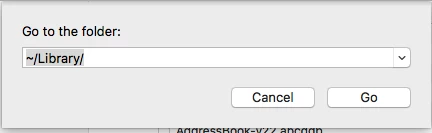
You can then get to your library folder from the Finder --> Go to Folder... this is all I typed in then I just expanded to the folder I needed.

3 replies

Participant
June 17, 2024

Sorry that does not work.


The higherarchy you are showing isavailable  on my computer under Libraries so I can not find my buried custom brushes.

Ton Frederiks
Community Expert
Community Expert
June 17, 2024

Just try to Save Brushes from the Brushes panel to see where they are saved.

Participating Frequently
October 21, 2020

Thank you so much!  All these know it all men had no idea or clear directions but you did.  THANK YOU!

Debbie KellerCorrect answer
Participating Frequently
September 19, 2017

You will need to go to your Library folder, if you go to the Brush Libraries Menu and choose Save Library you will see the path to your libraries you have saved, in my screen grab mine is called mylibrary.ai.

You can then get to your library folder from the Finder --> Go to Folder... this is all I typed in then I just expanded to the folder I needed.

Participant
September 19, 2017

THANK YOU SO MUCH! I've literally been here an hour trying to find this but I couldn't find how to get to the library!

Thank you very very mucho!