


Inspiring
March 15, 2025
Question

How do I determine which objects are completely off the artboard?

  • March 15, 2025
  • 2 replies
  • 725 views

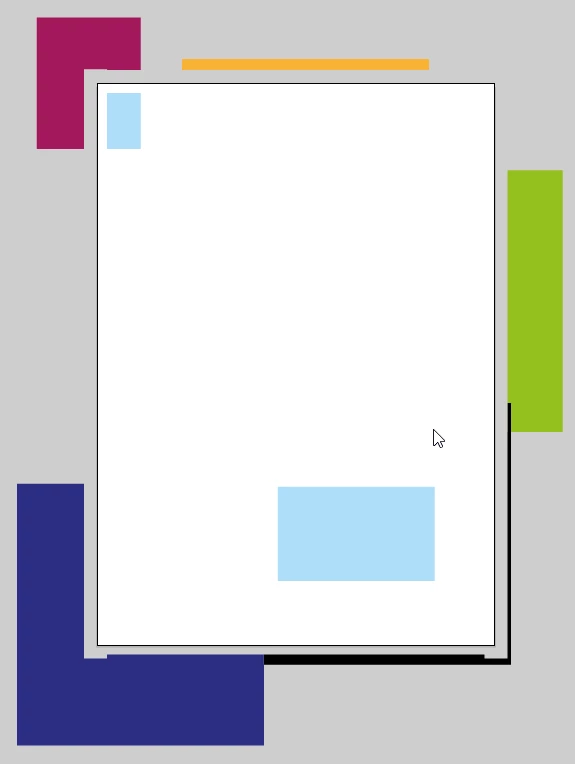
How to find (delete) all objects, any point of which does not intersect with the artboard? In my example, this is all objects except for the light blue ones. In other words, you need to determine which objects are completely off the artboard. 
 

2 replies

Kurt Gold
Community Expert
Community Expert
March 15, 2025

Your request is marked with the scripting tag.


Some questions:


  • What should happen with locked and/or hidden objects that are completely outside the artboard boundaries?
  • What should happen with locked or unlocked guides?
  • What should happen with entirely locked and/or hidden layers?
  • If there is more than one artboard, do the objects inside of the inactive artboards qualify as candidates that should be deleted as well, or should they be protected?


Also, a sample Illustrator file always helps to respond to the request.

Inspiring
March 16, 2025

Since it's not explicitly stated in the question, it's assumed that everything is ignored. As for the example file... - if someone can handle a script, he can surely handle such a file.

Ton Frederiks
Community Expert
Community Expert
March 15, 2025

In your example it would be simple, just draw a selection rectangle that includes the blue elements and use Select > Inverse and delete the selection (if  you unlocked the objects)


renél80416020
Inspiring
March 15, 2025

Bonjour,

Sélection > Tout sélectionner sur le plan de travail actif (ALT+CTRL+A)

puis inverser la sélection et supprimer.

Ton Frederiks
Community Expert
Community Expert
March 15, 2025

Yes, it is that simple, should have thought about that; Select > All on Active Artboard