


Participant
October 7, 2013
Answered

How do I display Tamil fonts in Adobe CS6? Please help..

  • October 7, 2013
  • 3 replies
  • 47192 views

Hello

I am creating a document in Tamil. Normally I type in Google document. Then copy and paste in Word. It works perfectly.

Now I am creating a poster in Adobe illustrator. I did type in google and pasted in notepad. It works perfectly.

When I copy and past in Adobe Illustrator the font is not displaying correctly.

I need it urgently. Can any one help?

I did googling, and found the following. But I am unable to find similar settings in Adobe Illustrator CS6

Thanks Ellis home. The issue got solved. That David's message which you pasted above was really helpful.                                  

In preferences-->Type-->Text Engine options I selected 'Middle Eastern', previousy it was 'East Asia', after that the Tamil letters are getting displayed correctly. Thanks a lot...

I have seen another post  which says I need to enable show Indic option.

http://helpx.adobe.com/illustrator/using/indic-support.html

Unfortunately I do not have Indic option. My screen looks different
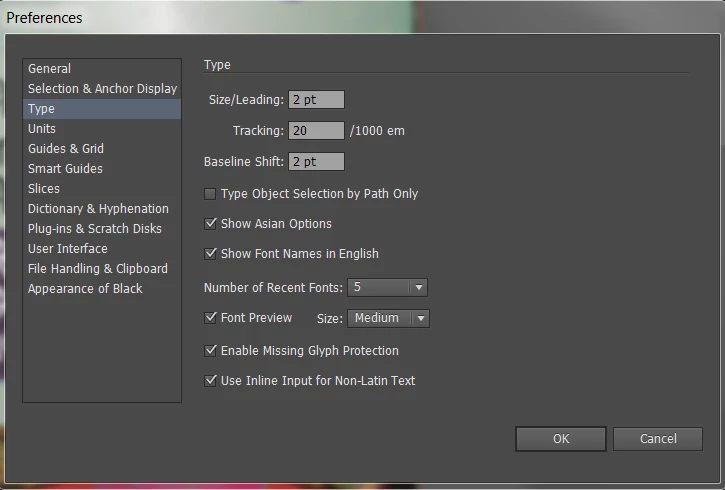
I have some tamil fount installed. When I tried to change the fount to tamil font, it does not work either.

I have another font called Latha. When I changed to Latha font the character displayed in Tamil but all spelling went wrong in Tamil.

Please help. Appreciate.

Thanks

Note; I am new to Adobe illustrator So if I made a silly mistake, my applogies.

This topic has been closed for replies.
Correct answer Monika Gause

You're out of luck in your version. Support for Tamil has been added in CC

http://helpx.adobe.com/illustrator/using/indic-support.html

You might try

http://www.winsoft-international.com/en/news/ScribeDOOR-CS5.html

(also available for CS6)

3 replies

David Mohr
Community Manager
Community Manager
June 23, 2016

Photoshop added support for ten Indic languages with the first release of Photoshop CC in June of 2013.  There might be some limited support in CS6, but it was never officially tested.  You can find more info in my video on the topic: How to access Arabic and Hebrew features in Photoshop CS6 - YouTube

Thanks,

David

Participant
December 9, 2016

I've been working on some translations and Tamil is definitely broken(either again or never fixed) in Illustrator CC. I have gotten this fix to work for several languages, but not Tamil.

David Mohr
Community Manager
Community Manager
March 17, 2017

Howdy Lisette,

I can't speak for Illustrator, but if you have specific issues with Tamil in Photoshop that are not working, please feel free to let me know.  You can either respond to this thread or email me at david <dot> mohr <at> adobe <dot> com.  Ok?


Thanks,
David

Marvest
Inspiring
October 7, 2013

The first post you referred to applies to Photoshop CS6. So, Indesign CS6 and Photoshop CS6 support Indic languages but not Illustrator CS6. Don't know why it was left out!

Monika Gause
Community Expert
Monika GauseCommunity ExpertCorrect answer
Community Expert
October 7, 2013

You're out of luck in your version. Support for Tamil has been added in CC

http://helpx.adobe.com/illustrator/using/indic-support.html

You might try

http://www.winsoft-international.com/en/news/ScribeDOOR-CS5.html

(also available for CS6)