Known Participant
June 6, 2017
Answered

How do I draw a double line in illustrator?

  • June 6, 2017
  • 2 replies
  • 32270 views

Hi there,

Can anyone tell me how to draw w double line in illustrator which would look like the one attached.

I want to achieve this style to use it with my pen tool to draw different shapes.

I know i can draw two lines with different stroke widths and then group it but for convince i want to draw just one one line.

Any help much appreciated.

Thx

    Correct answer Doug A Roberts

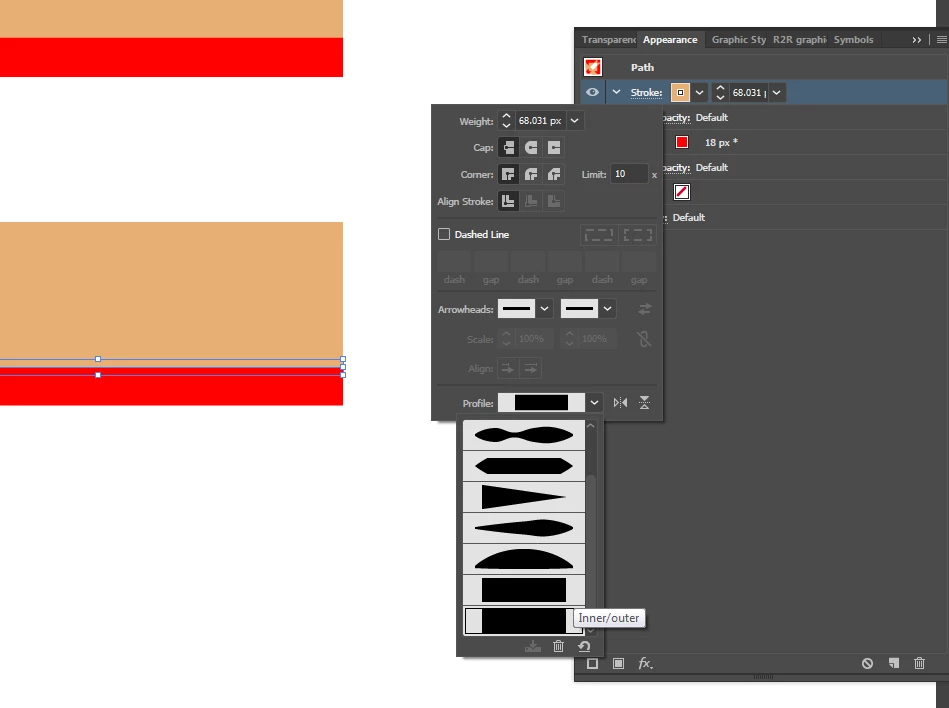
    use this width profile to set the stroke to one side of the path, or make your own:

    2 replies

    KamilaBAuthor
    Known Participant
    June 6, 2017

    Thanks for reply Monika:)

    I thought that the easier way would be to add a stroke on one side of the line but it doesn't work with open shape ie U shape.

    I need to try brush pattern but also don't know how to set this one up.

    Thx

    Doug A Roberts
    Community Expert
    Doug A RobertsCommunity ExpertCorrect answer
    Community Expert
    June 6, 2017

    use this width profile to set the stroke to one side of the path, or make your own:

    KamilaBAuthor
    Known Participant
    June 6, 2017

    Thanks for the reply i will try to create this profile.:)

    Monika Gause
    Community Expert
    Community Expert
    June 6, 2017

    Two possiblities:

    - a brush (pattern brush or art brush will work

    - an appearance that has 2 strokes. One f them needs to have a specific width profile applied that aligns it only to one side of the path.