Inspiring
Sep 28, 2024 9:44 PM UTC
Answered

How do I draw a thick curved line?

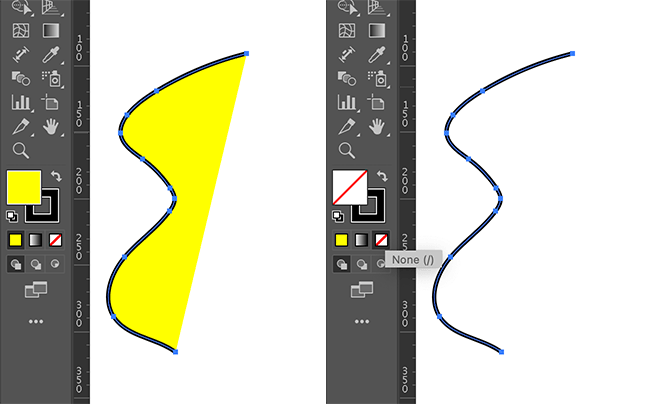
I keep getting a filled-in half moon.

I am drawing gnomes and I need "emphasis" lines like defined round cheeks and lines within pointed ears.

This topic is closed to new replies. Start a new post to keep the conversation going.
Ton Frederiks
Ton FrederiksCorrect answer
Community Expert
Sep 28, 2024 10:51 PM UTC

You have a fill and a stroke. When your object is selected (or before you start drawing), click the none button in the toolbar with the Fill as target.

5 replies

Monika Gause
Community Expert
Community Expert
Sep 28, 2024 9:53 PM UTC

You are using the brush tool and they keep getting filled in?


First of all: do you need a calligraphy brush on your stroke?

If so, then what you could do is apply the zigzag effect with a size of 0 and a high value for the ridges, such as 50 or even higher.

Translate
Inspiring
Sep 28, 2024 10:01 PM UTC

I apologize.  This is only my fourth day of using Illustrator and your answer is a little more sophisticated than I can respond to.  I am using the curvature tool.  I do not know what settings to use to remove the fill and just make it a line.  This is what it looks like.

Translate
Ton Frederiks
Community Expert
Ton FrederiksCommunity ExpertCorrect answer
Community Expert
Sep 28, 2024 10:51 PM UTC

You have a fill and a stroke. When your object is selected (or before you start drawing), click the none button in the toolbar with the Fill as target.

Translate