How do i export SVG curved text to AI?
Hi, i have some svg files with curved text which opens fine in all browsers but when i try to open in AI it doesn't read it correctly. That's the example:
<?xml version="1.0" encoding="UTF-8"?>
<svg version="1.1" xmlns="http://www.w3.org/2000/svg" xmlns:xlink="http://www.w3.org/1999/xlink" x="0px" y="0px" width="13in" height="19in" viewBox="0 0 221 323"><g xmlns:default="http://www.w3.org/2000/svg" xmlns:xlink="http://www.w3.org/1999/xlink"><default:svg xmlns="http://www.w3.org/2000/svg" xmlns:xlink="http://www.w3.org/1999/xlink" viewBox="0 0 92.125 42.46875" preserveAspectRatio="none" x="20.468799" y="120.124992" width="165.999951" height="70.999922"><default:g id="0.3456315122220943"><default:text fill="#FF0000" stroke="none" stroke-width="0" stroke-linecap="round" stroke-linejoin="round" x="" y="" text-anchor="start" font-size="24px" font-family="arial" style="paint-order:stroke;" data-textcurve="-121" data-itemzoom="1 1" data-textspacing="-16.123966942148762" itemzoom="0.5397621268656716 0.5657552083333334"><default:textPath xmlns:xlink="http://www.w3.org/1999/xlink" xlink:href="#textPath-item-0"><default:tspan dy="16.123966942148762">Create</default:tspan></default:textPath></default:text></default:g><default:defs><default:path id="textPath-item-0" d="M 16 3.640625 A 34.09335640447873 34.09335640447873 0 0 0 75.34669388069425 3.6406250000000036"/></default:defs></default:svg></g></svg>
That's how it looks in browser:

And that's how it looks in AI
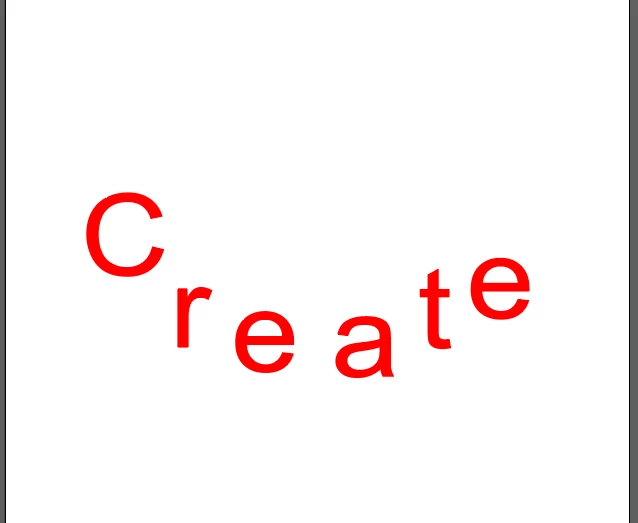
With that i can't edit this text becouse AI finds it as N different letters, also it loses angle.
What should i do to make it displays normal if all my svg's is generated with code (js/php)? Should i ask for this feature ?
 AdChoices