



yash-lucid
Inspiring
September 18, 2024
Answered

How do I eyedrop a gradient AND it's position/scale

Each time I use the eyedropper tool to copy a gradient, say from one circle to another, it works however it doesn't copy the gradient's position/scale/etc - instead it makes all the colors fit into the shape - how do I copy the entirety of the gradient?

renél80416020
renél80416020Correct answer
Inspiring
September 18, 2024

Bonjour,

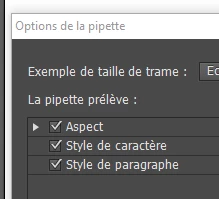
Options de l'outil pipette (cochez Aspect)


4 replies

AnnSymbolArts
Participant
February 14, 2025

Translation please? I want to know if it's possible to copy the gradients angle

Translate
yash-lucid
Inspiring
February 14, 2025

Yes it is - Double click the Eyedropper tool and then checkbox enable all the appearance settings 

Translate
renél80416020
renél80416020Correct answer
Inspiring
September 18, 2024

Bonjour,

Options de l'outil pipette (cochez Aspect)


Translate
yash-lucid
Inspiring
September 18, 2024

Merci !

Translate