


Participant
Jan 29, 2025 1:27 PM UTC
Answered

How do I find the font, bold and text size when I select a sentence in a PDF?

Hello,

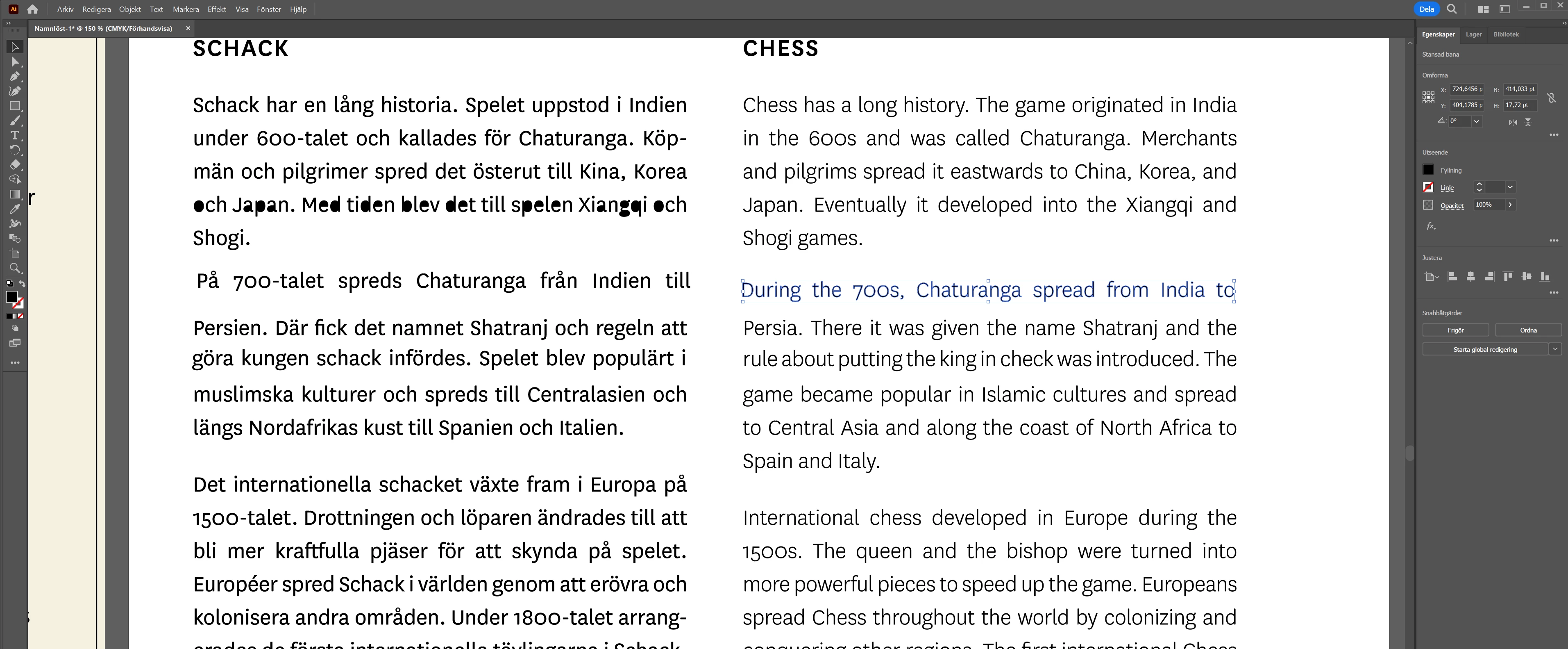
I have an existing PDF that I have opened in Illustrator. I have managed to ungroup all objects so I can select a sentence. But I cannot find out the font, text size or if the text is bold. Please see the attached image.


The sign holds two columns of text - one seems to be bold, the other is not. I have selected a sentence (as marked by the blue area), but I find no field in Illustrator that indicates what the font, boldness or text size is.

Any tips would be appreciated!

Monika Gause
Monika GauseCorrect answer
Community Expert
Jan 29, 2025 6:21 PM UTC

You could try and use Type > Retype to identify the font.

7 replies

Community Expert
Jan 29, 2025 4:33 PM UTC

Is the text still live in the PDF? You can open the PDF in Adobe Acrobat, right-click in a blank area on the page and select "Properties" from the flyout menu. The Properites dialog box will have a Fonts tab that lists any fonts embedded in the PDF.

Translate
Participant
Jan 29, 2025 5:45 PM UTC

I find the font used in the document (Myriad Pro, see image below), but I cannot find the size of the characthers or if the left section is bolded or not. (When I try to recreate it in Illustrator it never looks the same)


Translate
Community Expert
Jan 29, 2025 6:02 PM UTC

When viewing the PDF in Adobe Acrobat, if the text is live you should be able to mouse over the lettering and see a text cursor appear. Left-click and highlight the text you want to select. You should see a flyout menu appear with options. In the upper right corner of the flyout menu, click the icon for Edit a PDF. You'll see a menu to the left appear showing the font ID and size info.

Translate
Monika Gause
Community Expert
Community Expert
Jan 29, 2025 4:01 PM UTC

Looks like the text has been outlined (converted to paths)

Translate
Participant
Jan 29, 2025 5:40 PM UTC

Yes, I cannot select the text and edit it. I can just move the characthers, words and sentences around. I just want to find out the font used and the size, to create the bold effect to the left so I can recreate it : / 

Translate
Monika Gause
Community Expert
Monika GauseCommunity ExpertCorrect answer
Community Expert
Jan 29, 2025 6:21 PM UTC

You could try and use Type > Retype to identify the font.

Translate