
Participant
March 2, 2023
Answered

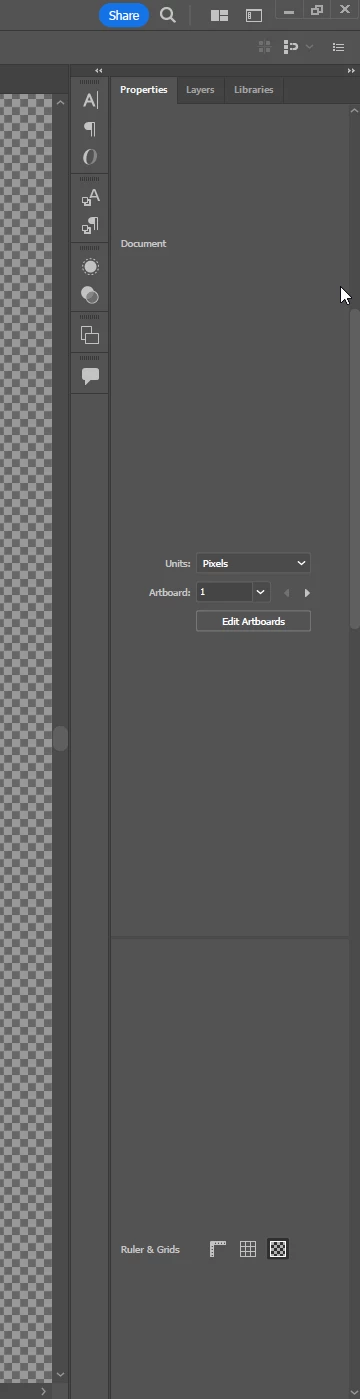
How do I fix an improperly spaced Properties Panel?

  • March 2, 2023
  • 2 replies
  • 655 views

As shown in the attached picture: The spacing between the text and fields is WAY too much. I've tried reinstalling AI, resetting my workspace, and updating to the most recent version to no avail. Does anyone know how I can fix this? Thanks in advance.
 

This topic has been closed for replies.
Correct answer Myra Ferguson

You could try resetting Illustrator's preferences:

2 replies

Inspiring
March 19, 2024

Did you ever find a solution for this? Ive also done all the same. Resetting preferences, installing new etc..nothing seems to help it. On my MAC its spaced fine, Im only having this issue on my windows comp.


Anubhav M
Community Manager
Community Manager
March 26, 2024

Hello @CCM86,

We understand that encountering technical issues can be frustrating. Would you mind trying to change the resolution and scaling under the OS settings to the defaults for the monitor(s) (Windows / macOS), restarting your computer and then relaunching Illustrator to check if it helps?

Also, try running Illustrator under a different administrator account (Windows / macOS) and share your observations.

Looking forward to hearing from you.

Thanks,
Anubhav

Myra Ferguson
Community Expert
Myra FergusonCommunity ExpertCorrect answer
Community Expert
March 4, 2023

You could try resetting Illustrator's preferences: