
December 7, 2025
Answered

How do I fix these wonky and uneven curves??

  • December 7, 2025
  • 3 replies
  • 235 views

I want to make these curves have the same curvature so that they won't look weird on the logo but I've been readjusting them with the direct selection tool and the curvature tool for hours and they still look really bad, how do I make them look more even? This is really urgent and I'm really desperate please help😭 
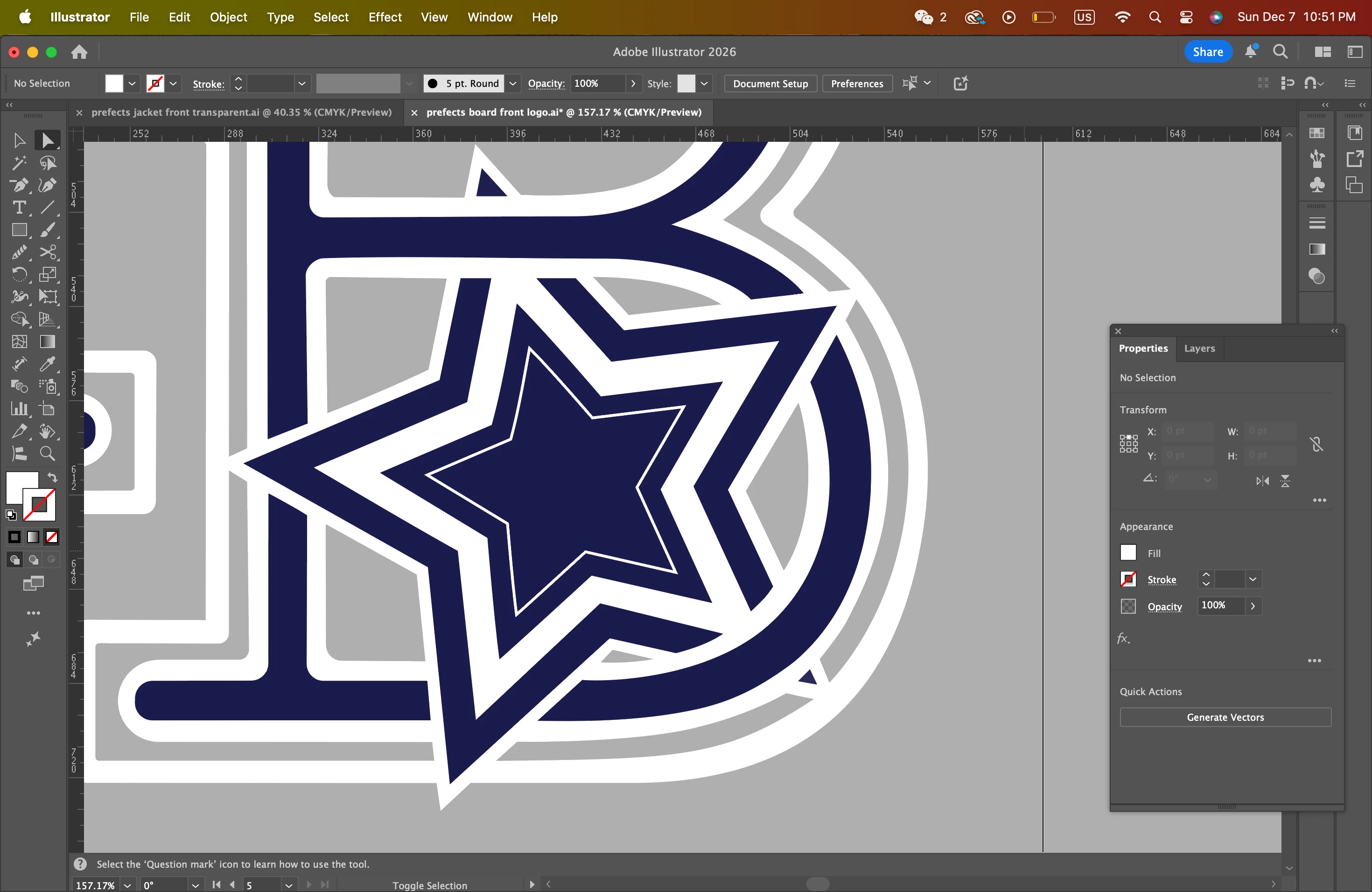
Screenshot 2025-12-07 at 10.51.58 PM.png

Correct answer Monika Gause

To create these parallel running lines on any path there are 2 methods.

1. Applying a stroke and outlining it

2. Object > Path > Offset path


Basically you have to delete the current ones that you do not like and then generate new ones using one of those methods.

3 replies

Mike_Gondek10189183
Community Expert
Community Expert
December 8, 2025

How is this built, can we see the outline? It looks like you have 2 paths for a stroke inner and outer, then filled as a compound shape. Is best to build with strokes rather than fills on a compound shape.

I wodl build the inner blue B with storokes, then when perfect you can outline the strokes and joining in pathfinder for a perfect shape. Then in appearance you can add strokes to that using offset path, and choose either square or rounded joins.

Mike_Gondek_0-1765207546465.png


Community Expert
December 7, 2025

It's fairly difficult and time consuming to create outline effects by hand around existing shapes and end up with results that are accurate.


You'll have to start with the dark blue "B" shape, using it as a source to create duplicate paths around it. Like Monika said, the Offset Path effect is one option. Using line strokes is another option. You'll need to create duplicates of the "B" shape when applying and expanding these effects.


Depending on the shapes being offset, sometimes it's necessary to go back and make adjustments to new paths. There are rare occasions where math creates results that don't look right.

Monika Gause
Community Expert
Monika GauseCommunity ExpertCorrect answer
Community Expert
December 7, 2025

To create these parallel running lines on any path there are 2 methods.

1. Applying a stroke and outlining it

2. Object > Path > Offset path


Basically you have to delete the current ones that you do not like and then generate new ones using one of those methods.