Known Participant
January 6, 2025
質問

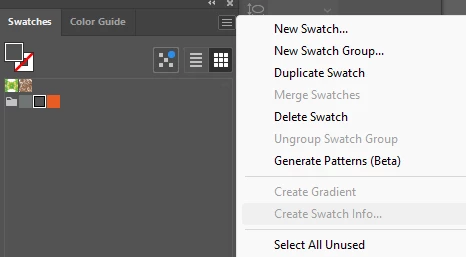
How do I get the swatch info to appear in the swatches panel?

  • January 6, 2025
  • 返信数 1.
  • 7154 ビュー

返信数 1

Ton Frederiks
Community Expert
Community Expert
January 6, 2025

It does not appear in the panel:

Create swatch information

Create Swatch Info lets you create color specifications for multiple colors on cards to share with collaborators.

  1. Select your colors from the Swatches panel and choose Create Swatch Info from the Swatches panel menu.

  2. In the dialog box that appears, you can adjust the card’s width, height, text color, stacking order, and spacing between each card.

Known Participant
January 6, 2025

The option to select 'Create swatch info' isn't available to be selected, see attached pic 

Ton Frederiks
Community Expert
Community Expert
January 6, 2025

You must have at least 2 swatches selected in the panel to generate the info.