Participant
April 27, 2018
Answered

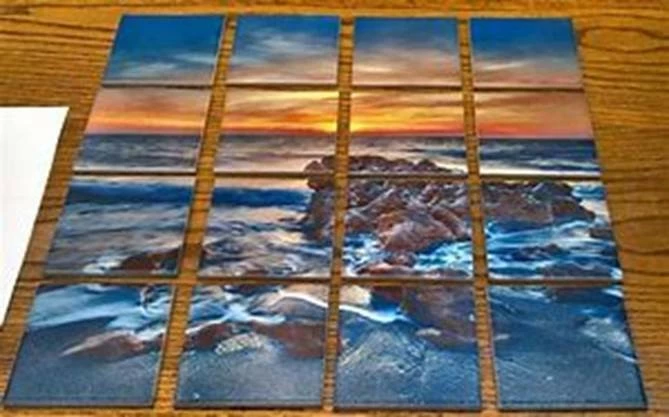
How do I make a grid that will print over my photo?

  • April 27, 2018
  • 3 replies
  • 950 views

I need to make an image similar to this one, either in Photoshop or Illustrator, but I can't seem to find what I need to do. Does anyone have any advice? Basically, I ne

This topic has been closed for replies.
Correct answer Myra Ferguson

You could make the table by drawing one rectangle with a white fill and black stroke with the stroke being the with of the space you want between the boxes. Then go to Object > Path > Split into grid... and set the number of rows and columns.Group the rectangles, select the group and the image, and make a transparency mask.

3 replies

Inspiring
April 27, 2018

The composite looks like tiles to me.  I would create the entire image in Photoshop ( bevels, shadows, highlights, etc. ).

Myra Ferguson
Community Expert
Community Expert
April 27, 2018

If you want to avoid it looking like hard edge tiles, you can apply an effect to the rectangles while they are ungrouped. While they are selected, go to Effect > Stylize > Inner Glow, set the Mode to Multiply and the color to black. Then group all the tiles and make the transparency mask. That will soften the transition.

Myra Ferguson
Community Expert
Myra FergusonCommunity ExpertCorrect answer
Community Expert
April 27, 2018

You could make the table by drawing one rectangle with a white fill and black stroke with the stroke being the with of the space you want between the boxes. Then go to Object > Path > Split into grid... and set the number of rows and columns.Group the rectangles, select the group and the image, and make a transparency mask.

Participant
April 27, 2018

Perfect! Thank you!

Bill Silbert
Community Expert
Community Expert
April 27, 2018

Place the Photo. Draw the boxes with no fill or stroke. Select all of the boxes and with Command (Mac)/Control (PC)-8 make them into a Compound Path. Put that compound path into position over the photo, select all and with Command (Mac)/Control (PC)-7 make a clipping mask out of the whole thing.

Participant
April 27, 2018

Thank you!