

blazedandconfused
Participant
March 14, 2022
Question

How do I make whole numbers the default for transform panel units?

  • March 14, 2022
  • 3 replies
  • 774 views

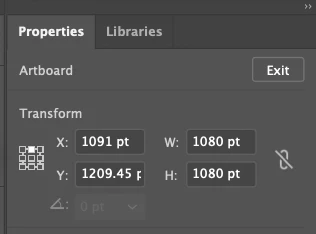
Unless I manually change the x and y position of an artboard to a whole number, there'll be an extra pixel added. I always do this manually and would be delighted to find a way to set whole numbers as a default.
This topic has been closed for replies.

3 replies

Ton Frederiks
Community Expert
Community Expert
March 14, 2022

When you create a new document, artboards are automatically aligned to whole numbers.

Always check the Upper Left XY for this.

When there are multiple artboards, using the rearrange all artboards.

kevinf78831444
Participating Frequently
March 14, 2022

Yea, that may be the best work around. I like option click dragging out new artboards for storyboarding and itterating and that always results in the position being a decimal. Like Met1 said, I could use snap to pixel but then I have to turn it on adn off.

Met1
Legend
March 14, 2022

Use snap to pixel?

kevinf78831444
Participating Frequently
March 14, 2022

Thanks! thought of that, but it's a pain cause I don't like to work with it on. 

Mike_Gondek10189183
Community Expert
Community Expert
March 14, 2022

Try putting the curosr inside the x or y. Then use the cursor key to go up or down. Use Shift cursor key to move increment by 10.

kevinf78831444
Participating Frequently
March 14, 2022

That works but I want it to be a default so I dont' have to manually change