Participant
July 21, 2026
Answered

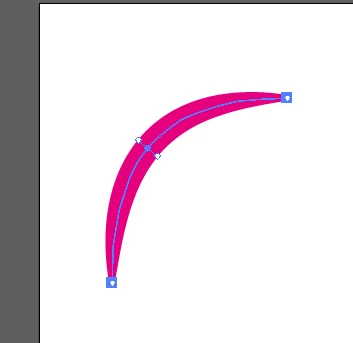
How do I recreate the highlight on the letters in this image?

  • July 21, 2026
  • 2 replies
  • 27 views

I would like to create highlights that looks like the ones in the sample image.

I've tried creating this highlight using two paths that have been offset with then the top one subtracted from the bottom one. That produces a highlight that runs the entire height of the letter.

I've also tried applying an art brush to a line segment, but getting the taper in the right place is challenging.

    Correct answer Nataliia_M

    Hi ​@***Jake*** 
    To recreate this manualy I would offer two ways:
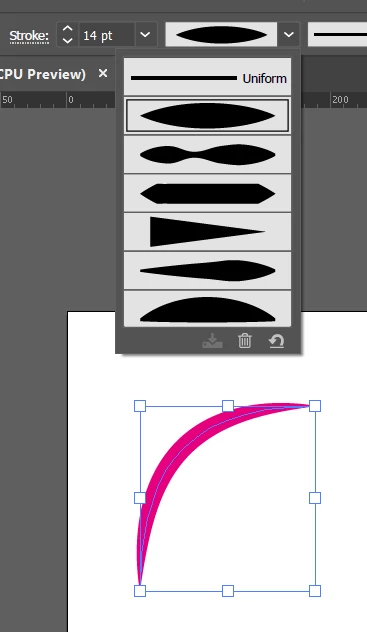
    1. Draw the line where you want the highlight to be and apply a Variable Width Profile from it’s dropdown menu
     

    OR
    2. Use the Width Tool on the bend turn.

    I hope this helps 🙂

    2 replies

    Participant
    July 21, 2026

    .

    Nataliia_M
    Nataliia_MCorrect answer
    Inspiring
    July 21, 2026

    Hi ​@***Jake*** 
    To recreate this manualy I would offer two ways:
    1. Draw the line where you want the highlight to be and apply a Variable Width Profile from it’s dropdown menu
     

    OR
    2. Use the Width Tool on the bend turn.

    I hope this helps 🙂

    Warmly, Nataliia
    Participant
    July 21, 2026

    WOW! I learned something today. Thank you.

    Nataliia_M
    Inspiring
    July 21, 2026

    @***Jake*** Always welcome! Feel free to mark that answer as correct so that other community participants can use it in the same situations 🙂 Now the mark is on your thank-you message ✅

    Good luck with your lettering project!

    Warmly, Nataliia