

Participant
February 20, 2026
Answered

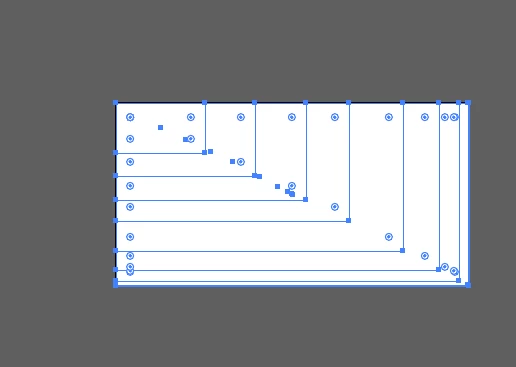
How do I remove all the lines when I make a square? I think it's some setting I've messed up.
  • February 20, 2026
  • 2 replies
  • 54 views

How do I remove all the lines when I make a square? I think it's some setting I've messed up.

 

    Correct answer Ton Frederiks

    That can happen when the ~ tilde key is pressed, or stuck.

    2 replies

    Kurt Gold
    Community Expert
    Community Expert
    February 20, 2026

    Camilla,


    as Ton mentioned, it is a regular functionality when the Tilde key is pressed (or some other key depending on what international version of Illustrator you are using).


    On rare occasions the mass duplication may also happen for some unknown reasons. In that case, quitting and restarting Illustrator usually solves the issue.

    Ton Frederiks
    Community Expert
    Ton FrederiksCommunity ExpertCorrect answer
    Community Expert
    February 20, 2026

    That can happen when the ~ tilde key is pressed, or stuck.

    Participant
    February 20, 2026

    Do you know how I can get it back to normal?

    Anubhav M
    Community Manager
    Community Manager
    February 20, 2026

    Hello ​@Camilla0D4D17697998 


    I’m sorry to hear about your experience. Would you mind trying to run Illustrator under Safe Mode (Windows / macOS) and checking if it helps?


    Looking forward to hearing from you.
    Anubhav
