
Participating Frequently
September 22, 2022
Answered

How do I replace the pictograms in my workspace with the names of the tools they represent?

  • September 22, 2022
  • 1 reply
  • 185 views

Hi!


I'm trying to make the tools in my workspace less abstract and easier to understand. So for example, I'd like to replace the pictogram of three lines with just the word "Line" without needing to open the whole window.


It looks like that in InDesign, but how do I do this in Illustrator?
This topic has been closed for replies.
Correct answer Doug A Roberts

Do you mean the panels/palettes rather than tools?

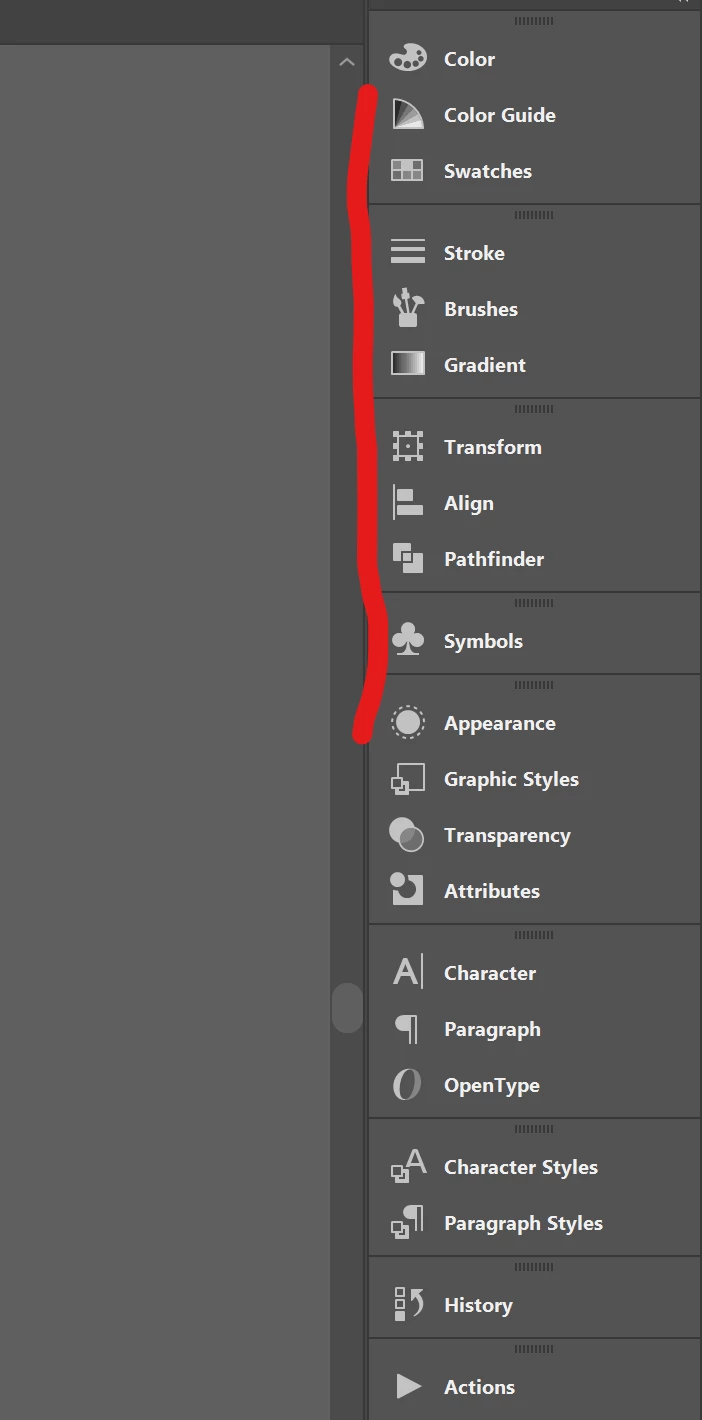
If so, click & drag where I've marked to expand/contract the panel names.

1 reply

Doug A Roberts
Community Expert
Doug A RobertsCommunity ExpertCorrect answer
Community Expert
September 22, 2022

Do you mean the panels/palettes rather than tools?

If so, click & drag where I've marked to expand/contract the panel names.

RotaAuthor
Participating Frequently
September 22, 2022

Oh wow, it's that simple huh?

Thank you so much!