Known Participant
July 24, 2018
Answered

How do I save a pattern file to be sent to printers

  • July 24, 2018
  • 1 reply
  • 686 views

Hi Guys,

I created a pattern via the pattern maker on illustrator which is now saved into my swatches.

How do I save this new pattern as a file to send to my printers which is going to be printed out as wallpaper?

My printers don't use illustrator so I can't just send them the ai file.

They asked for it to be sent as a tiff file but there doesn't seem to be that option in the drop down?
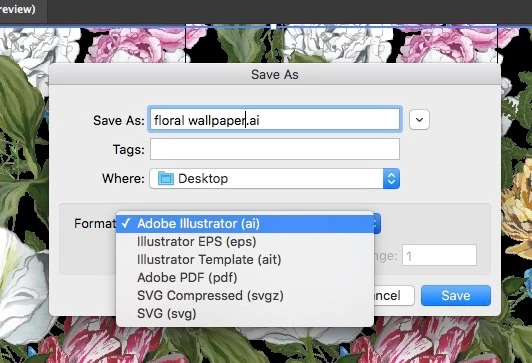
Any help would be appreciated!

Thank you!

    This topic has been closed for replies.
    Correct answer Monika Gause

    File > Export > Export as.

    You have to create an object on an artboard that is filled with the pattern.

    1 reply

    Monika Gause
    Community Expert
    Monika GauseCommunity ExpertCorrect answer
    Community Expert
    July 24, 2018

    File > Export > Export as.

    You have to create an object on an artboard that is filled with the pattern.

    Known Participant
    July 24, 2018

    Thank you!!