

Chris  P.  Bacon
Inspiring
November 24, 2022
Answered

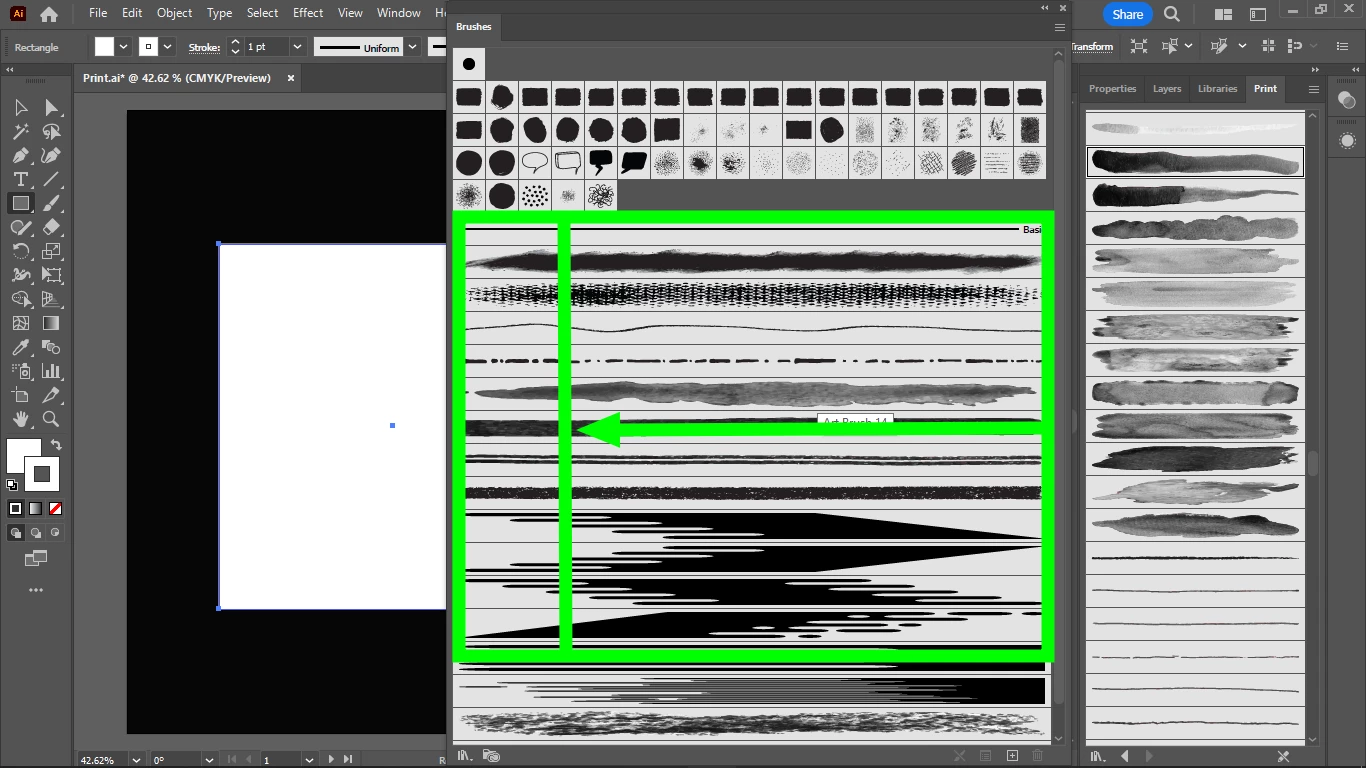
How do I see all my brushes at once?
  • November 24, 2022
  • 1 reply
  • 356 views

I would like to see all my brushes at once but because of the too wide icons of some brushes (I am not sure what is the difference between the small square iconed brushes and the brushes with the long rectangle icons) I cannot gain some place to see all my brushes, even if I extend the width of my brushes panel.

I don't want to use folders because there should be enough place to see all my brushes at once when I extend the width of my brushes panel.


This topic has been closed for replies.
Correct answer Doug A Roberts

Art brushes and pattern brushes will always take up the width of the panel.

The square icons are for calligraphic and scatter brushes.

1 reply

Doug A Roberts
Community Expert
Doug A RobertsCommunity ExpertCorrect answer
Community Expert
November 24, 2022

Art brushes and pattern brushes will always take up the width of the panel.

The square icons are for calligraphic and scatter brushes.