
Participant
June 10, 2022
Answered

How do I separate my artboard into two and export them separately?

  • June 10, 2022
  • 1 reply
  • 911 views

The problem that I'm having is stated on the subject. I tried:

adding rectangle to my artboard > Object> Path> Split into Grid but I'm not sure what to do next.
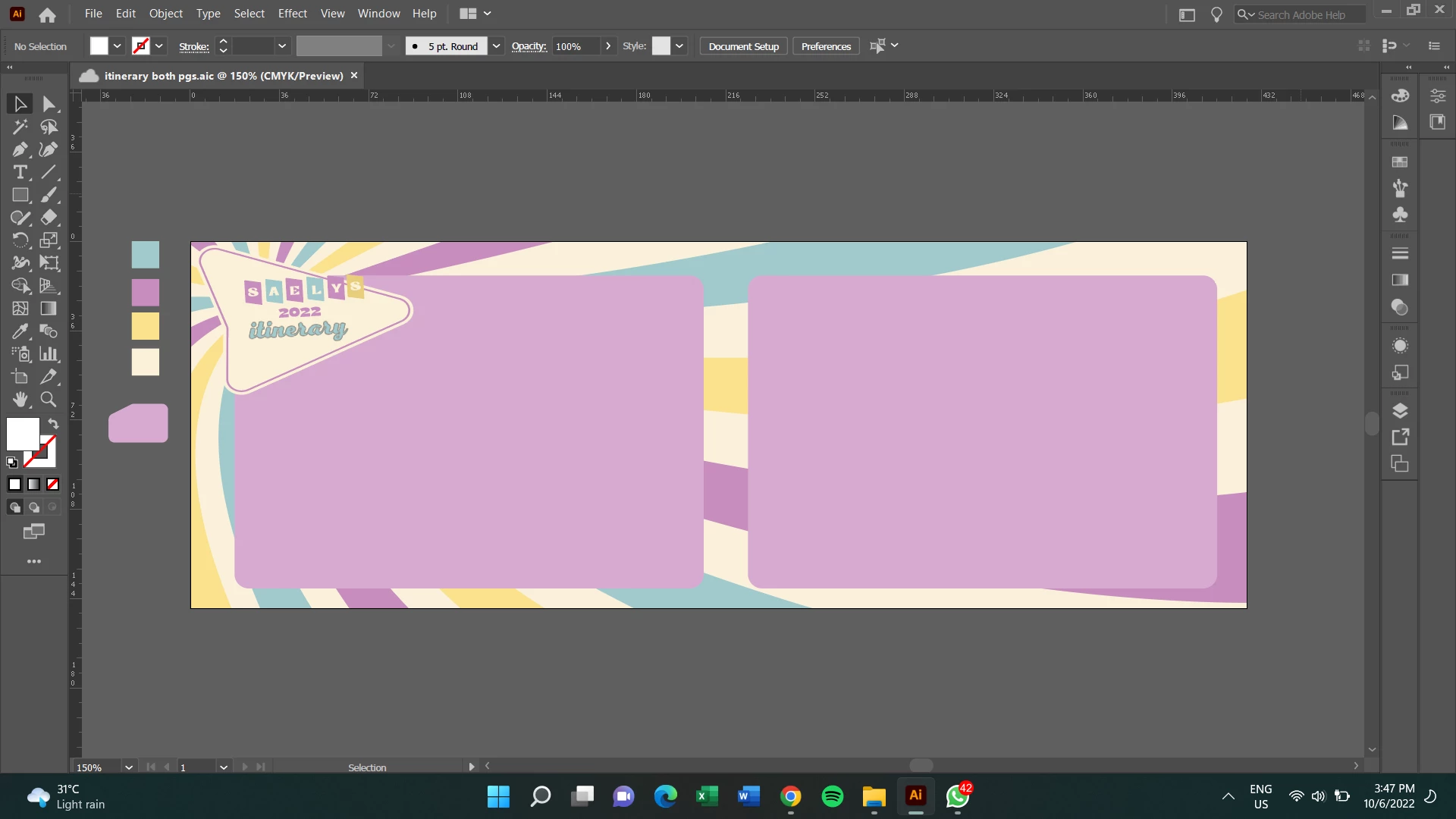
 

I rarely use Ai as I usually edit with Ps and the export settings is very different from each other

This topic has been closed for replies.
Correct answer Ton Frederiks

If you have to rectangles that have the size you want for the separate export, select them and choose: Object > Convert to Artboards.

You can delete the larger artboard if you want.

1 reply

Ton Frederiks
Community Expert
Ton FrederiksCommunity ExpertCorrect answer
Community Expert
June 10, 2022

If you have to rectangles that have the size you want for the separate export, select them and choose: Object > Convert to Artboards.

You can delete the larger artboard if you want.

Participant
June 10, 2022

Got it! Thanks Tom

Ton Frederiks
Community Expert
Community Expert
June 10, 2022

Good to hear that helped.