
Participating Frequently
May 13, 2013
Question

How do I unmerge connected paths in Illustrator CS5?

  • May 13, 2013
  • 1 reply
  • 49354 views

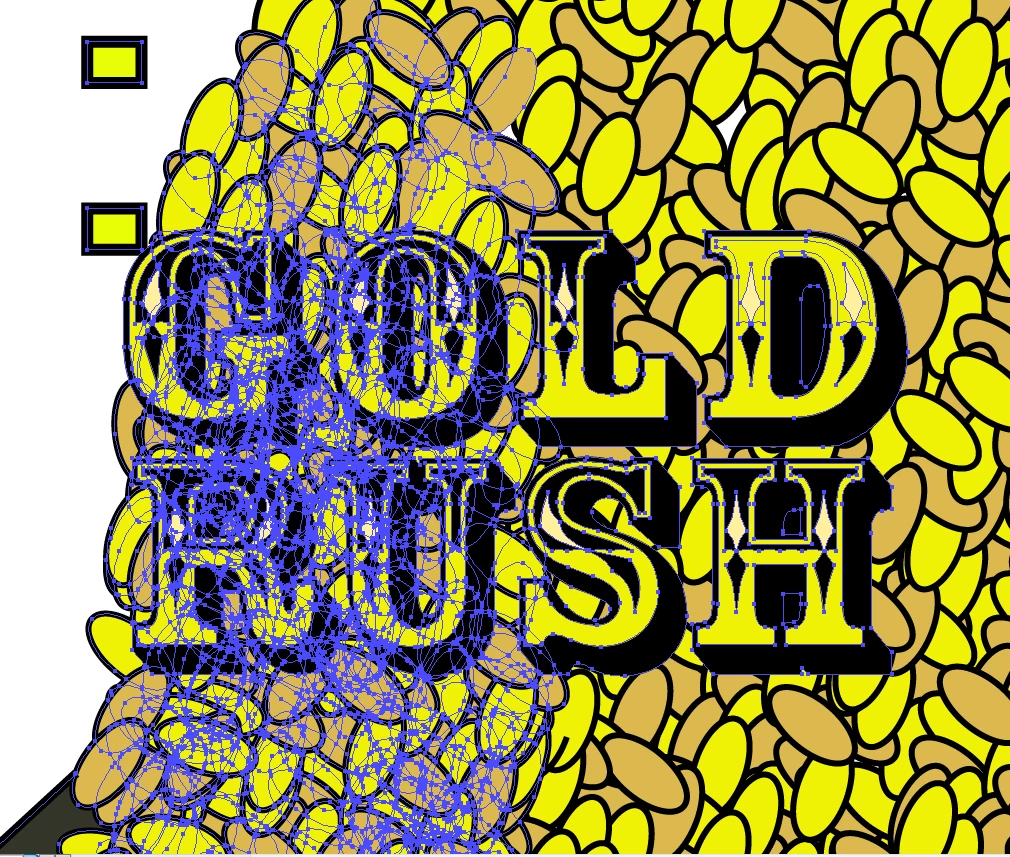
I was wondering if there was a way to 'unmerge' a group of connected paths. The thing is whenever I click on one of the ovals, it selects a whole group of ovals instead of just the one I selected. The problem is that I drew an oval, copied it multiple times until I made a pile out of it, then copied that pile and made other piles. So whenever I click on one of the ovals, it selects the entire pile. Is there a way I can 'unmerge' or ungroup all the paths so I can  select just one of the ovals? I'm not doing this so I can copy them again, I'm trying to delete them individually but I really can't.
    This topic has been closed for replies.

    1 reply

    Monika Gause
    Community Expert
    Community Expert
    May 13, 2013

    Go into the layer panel, find out what kind of object they are and then act accordingly. For instance: if it's a group, ungroup it.

    sinsenestAuthor
    Participating Frequently
    May 13, 2013

    Well I've already tried 'ungrouping' it that way and it doesn't work. And I'm not sure what you mean by what kind of object it is. How do I find that out? I'm still new to Illustrator so I'm not used to everything on there. 

    Jacob Bugge
    Community Expert
    Community Expert
    May 13, 2013

    sinsenest,

    Yoy may deselect and then use the Direct Selection Tool (white arrow) to delete each.

    If you can just click the fill of a path you can press Delete once and it is gone. If you have to click the stroke (the actual path) you will have to press Delete twice.

    There seems to be something strange, where parts of stroke sare missing. In some places it looks like a stroke applied to a group of paths, in other places it seems even weirder. Is that part of your present editing?