

Answered
How do you change the default type tool
My current default type tool is set to the Area Type tool instead of the standard T type tool. How do I change this? Windows 10, Adobe 2019.

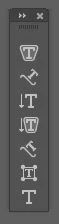

My current default type tool is set to the Area Type tool instead of the standard T type tool. How do I change this? Windows 10, Adobe 2019.
Already have an account? Login
Enter your E-mail address. We'll send you an e-mail with instructions to reset your password.

 AdChoices