
Known Participant
February 22, 2013
Answered

How do you create a one color halftone vector?

  • February 22, 2013
  • 2 replies
  • 51031 views

I've been creating them in black and white in CS6, then converting to vector via image trace since that's the only way to make them a perfect circular vector that I've found, but how do you convert it to a color afterward? It won't let me simply change the fill color, nor will it let me select the black dots with the white arrow. I had also selected "ignore white" while image tracing so it had a transparent background. Help! I'd really like an orange halftone vector, and when I make it a color from the start it creates it out of multiple colors. I want it to be a solid color without any circles overlapping. Thanks in advance!
This topic has been closed for replies.
Correct answer Michael Riordan

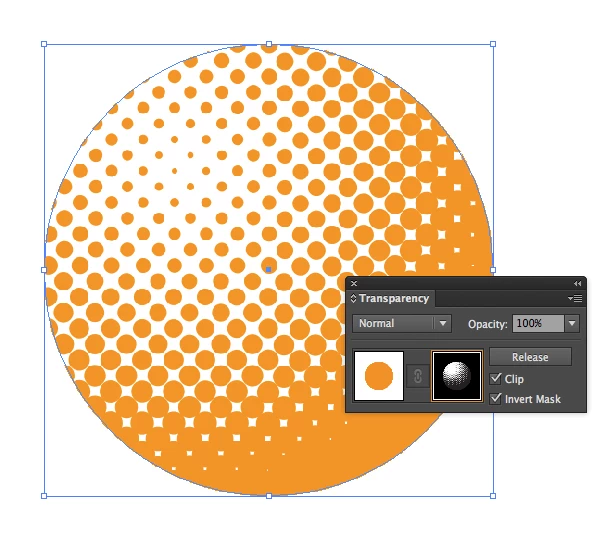
Maybe this solution will work for you. I created a halftone pattern on an object with a white to black gradient using the Effects>Pixelate>Color Halftone option. I copied that halftone to the clipboard,replaced the fill of the object with a spot orange color, and added an opacity mask in the transparency panel. Selecting the mask, I pasted the clipboard contents (paste in place) into the opacity mask and checked the invert mask option.

It's a little convoluted, but it works! If you need to improve the quality of the halftone edges, increase the resolution used via the raster effects settings under the effects menu.

Hope that helps,

Michael Riordan

Adobe Certified Instructor

Digital DesignLab

Message was edited by: Michael Riordan image added to post

[link deleted by moderator]

2 replies

Participant
August 31, 2018

This seems to be a better solution: Illustrator Tutorial: Vector Halftone effect - YouTube

Monika Gause
Community Expert
Community Expert
August 31, 2018

soulsqueeze  schrieb

This seems to be a better solution:

You might want to read the thread until the end before repeating what has been said years ago (post #8 )

_scott__
Legend
February 22, 2013

Can't you just make it black, then trace it, and then color it orange? Don't start with orange.

Jshea22Author
Known Participant
February 22, 2013

Nope, tried that. I wish it was that easy. It's traced, I just can't get it to change color!

_scott__
Legend
February 22, 2013

Did you click the Expand button after tracing? There's no reason you shouldn't be able to change color after tracing.