Fadillah Abdi
Participant
August 6, 2024
Question

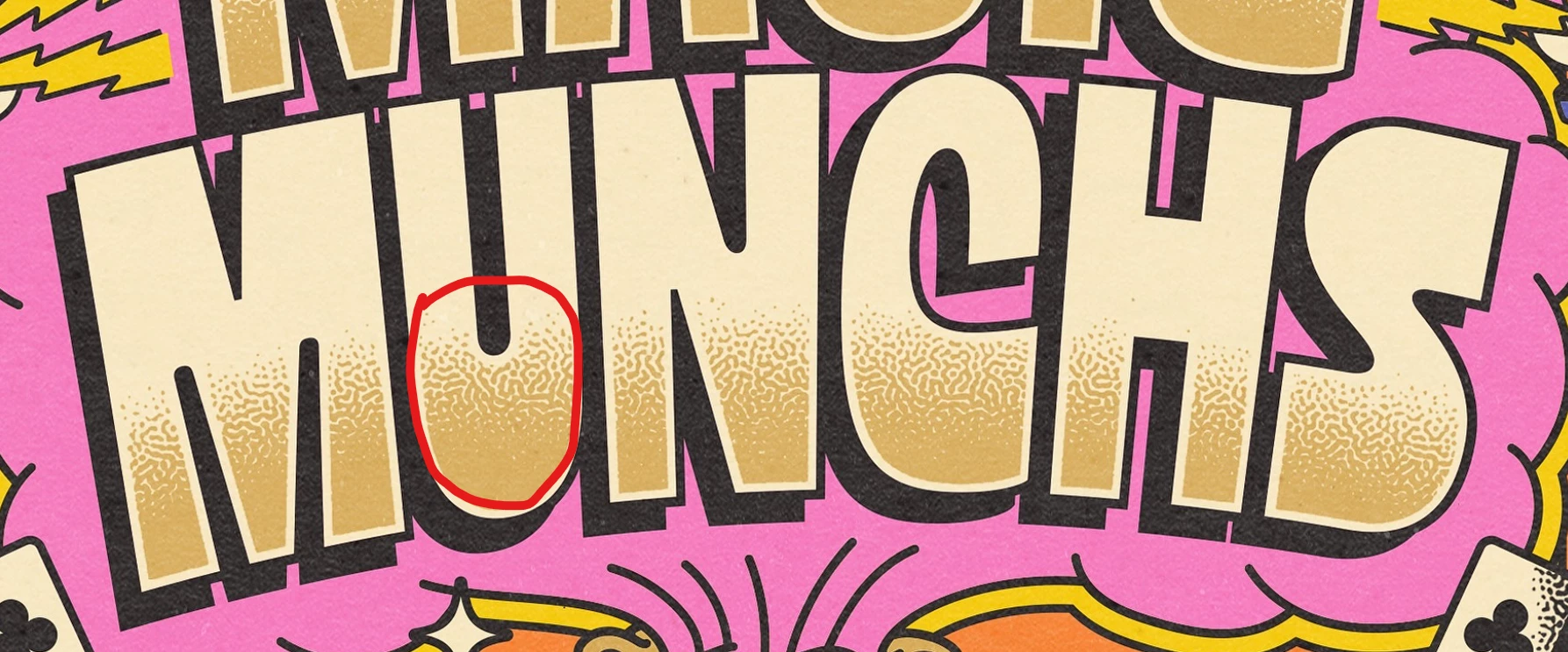
How do you create a turing pattern / reactive diffusion with a smooth fading effect like this?
  • August 6, 2024
  • 2 replies
  • 1003 views

2 replies

Participant
January 15, 2025

Here's a live effect version solely in Illustrator with a guide to making all kinds of patterns (even has a downloadable starter kit). You can control the fade using a gradient catalyst/color to have the turing pattern become 'more loose'. https://www.mattgyver.com/tutorials/2024/12/20/making-organic-turing-patterns-using-only-illustrator


Monika Gause
Community Expert
Community Expert
August 6, 2024

Simple in Photoshop, like here: https://www.youtube.com/watch?v=eKLki6-gynU


There are some more options here: https://graphicdesign.stackexchange.com/questions/160902/how-to-do-a-turing-pattern-dither-halftone-effect


But not a live effect. 

Fadillah Abdi
Participant
August 6, 2024

Thanks in advance, but I'm not just looking for how to create a Turing Pattern. I'm actually trying to make it look like a gradient, where the pattern fades out as it goes up. As you can see right here, the dots get smaller the higher they go:


I've tried doing it my way, but I'm stuck and not sure what to do next. The gradient I made looks too "digital."

Mike_Gondek10189183
Community Expert
Community Expert
August 6, 2024

Your last example filed a turing pattern with a gradient. You are looking I think for a turing pattern created by white or black with no grays.


There's a plugin stipplism by astute graphics, you should check out.


https://vimeo.com/398565244
