
samw_camdenboss
Inspiring
December 13, 2016
解決済み

How do you measure lines on illustrator from one guide to an other guide creating a diamention in the center of the path ?

  • December 13, 2016
  • 返信数 1.
  • 2180 ビュー

If I create 2 guide lines apart from each other, can I measure in-between these lines to find out a distance and a measurement is created in-between ? then if its not where I want it. Also can you move the same guide line again once it has been placed ?
このトピックへの返信は締め切られました。
解決に役立った回答 Barb Binder

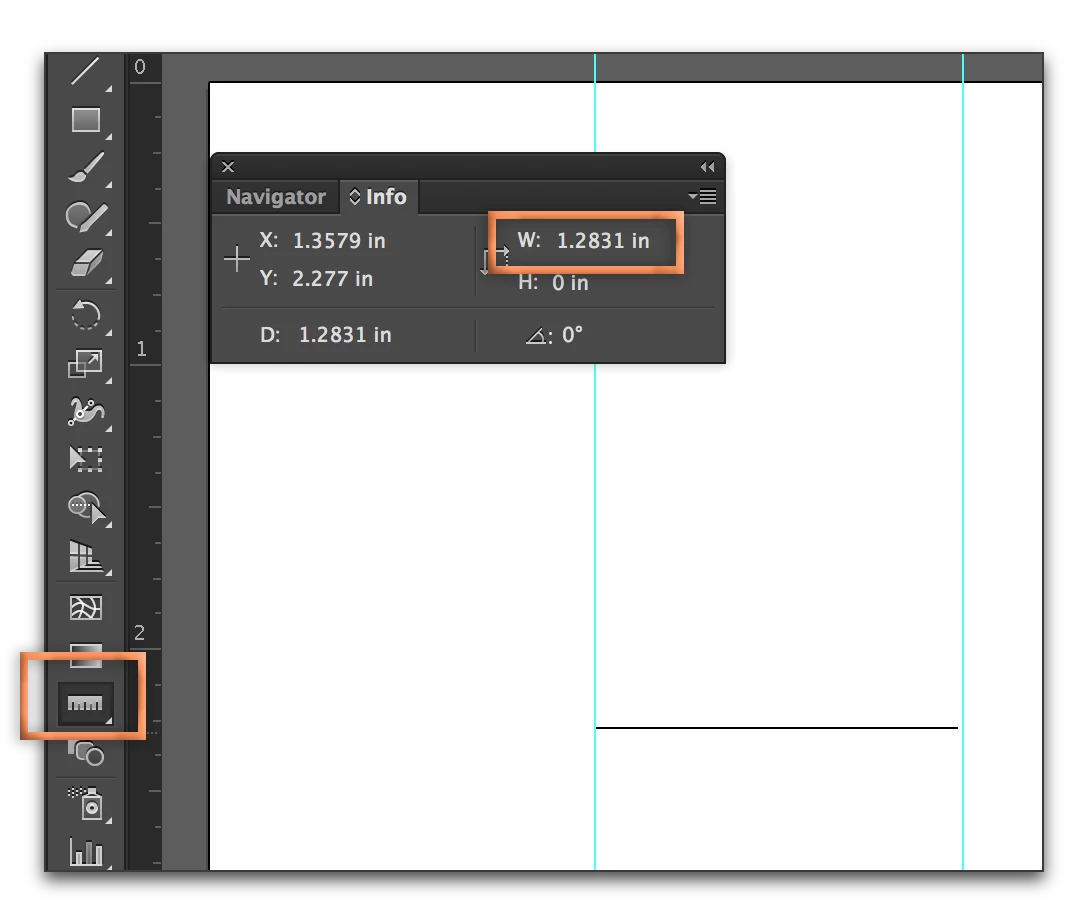
You can use the Measure tool (lives the eyedropper) to measure the distance:

To move a guide, click it with the Selection tool and you can drag it to a new position.

返信数 1

Barb Binder
Community Expert
Barb BinderCommunity Expert解決!
Community Expert
December 13, 2016

You can use the Measure tool (lives the eyedropper) to measure the distance:

To move a guide, click it with the Selection tool and you can drag it to a new position.

~Barb at Rocky Mountain Training
samw_camdenboss
Inspiring
December 13, 2016

Thank you I will try this now, this has saved me a lot of time creating artwork for people now!!